
DeepDive for Qlik Sense
Query your data live from Qlik Sense, without reloading the app, on all environments: Qlik Sense Enterprise and Qlik Cloud.
From aggregated dashboard to raw row, without a reload
Qlik Sense is a powerful analytics platform. But as soon as you deal with large volumes, raw detail or up-to-date data, everything has to be loaded into memory. That’s where DeepDive comes in: an extension that queries the source directly, at the moment you look at it — without copying it.
Explore your data live, securely, in one click.
- Query live. Access raw, up-to-date detail with no reload and nothing loaded into memory.
- Secure. Respect your Qlik security model on every query.
- Connect your sources. Available on Qlik Sense Enterprise and Qlik Cloud, connected to your databases.
How do you check the detail behind a figure?
Every business team ends up asking the same question: “what lies behind this number?”. The answer is always a detail row, often in a huge table, sometimes down to the second.
 Finance. The detail of an accounting entry.
 Support. The status change of a ticket.
 IoT · Industry. The technical anomaly reported by a sensor.
 HR. An employee’s salary history.
 Fraud. The suspicious transaction, row by row.
 Big data. Exploring a very high-volume table.
When data is very large or direct real-time access is needed, an in-memory application is not designed to answer these questions. DeepDive is.
Qlik and DeepDive: associative analysis, extended down to the source row
DeepDive does not replace associative analysis: it extends it. Users keep Qlik as their entry point, explore their KPIs, then drill down to the source row whenever they need to — on the same sheet.
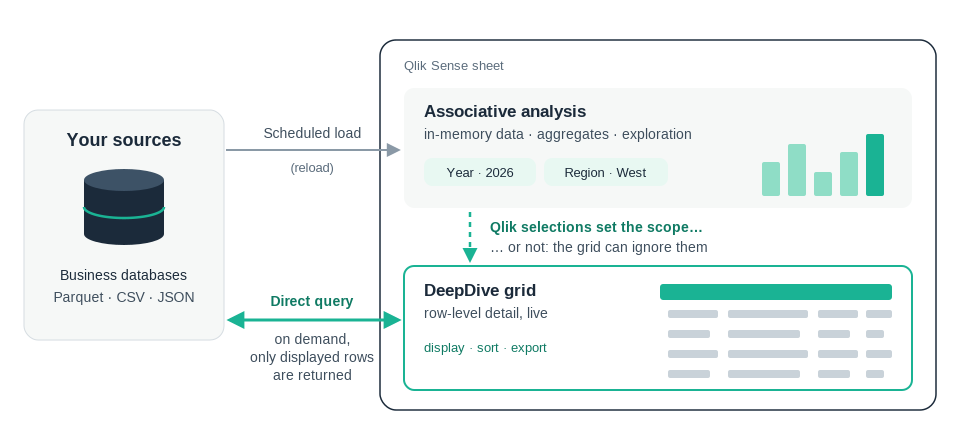
- Qlik’s strength. In-memory associative analysis: an exploration experience no query tool can match.
- Raw rows, hard to reach. Getting quickly to the detail, especially at very high volume, is not the natural ground of an in-memory engine.
- DeepDive takes over. An extension placed on the sheet, connected live to the source: the detail is available at any time, without leaving Qlik or touching the model.
Direct Query and ODAG partly address this need: the former with a restricted feature scope and a model to prepare, the latter by generating and reloading an app for each request. Neither is well suited to free exploration of the detail.
With DeepDive, I can…
- Get down to the last detail row. The source row, with no aggregation.
- Display and export grids. Data tables ready to share.
- Explore my big data. Tables with hundreds of millions of rows.
- Combine Qlik and DeepDive. Qlik selections narrow the scope… or not: each grid follows the sheet’s filters or ignores them.
Live and lightweight
A Qlik extension connected live to the source, displaying only what the user is looking at.
- No Qlik reload. No app reload, no preloading.
- Data stays where it is. No data moved or copied.
- Only the screen matters. Only visible rows are read: the volume you can browse is virtually unlimited.
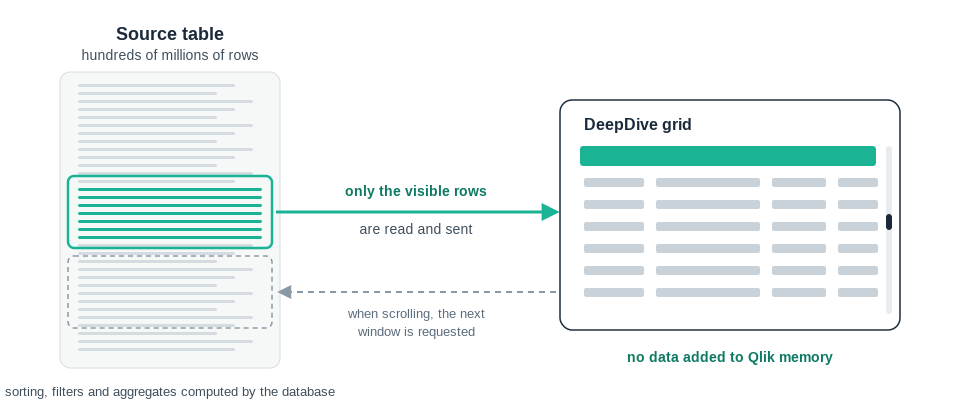
- 0 GB of additional Qlik memory for data queried live
- ~100× less data moved: only the rows displayed are fetched
- < 1 s to filter across 1M+ rows (public OnTime dataset), without reloading the app
Key features
Beyond direct access to your data, here are the main features of DeepDive for Qlik Sense.
Live table: driven by your Qlik selections… or not
Placed on a sheet like any standard visualisation, the DeepDive grid follows the user’s filters: the Qlik selection becomes the scope of the query. It can also be decoupled from them, to explore the whole table freely, independently of the sheet’s filters. Scroll through millions of rows, choose columns, sort, group and aggregate — the computation is handled by the database itself. An “on-demand refresh” mode is planned for slow sources, with a visual indicator when the grid is no longer up to date.
On-demand export: under control, even on large volumes
Download the displayed result as CSV or Excel. The export is streamed server-side, without overloading the user’s machine, and applies exactly the same permissions as the screen.
Security: respect your Qlik model on every query
Row-level security (RLS) is applied directly in the query, before any aggregation: each user only sees their own rows. Permissions rely on Qlik identities and groups — no second directory to maintain. Read-only access, credentials never stored in clear text, and a centralised admin console for connections and rules.
Connectivity: your data stays where it already lives
DeepDive connects to your existing business databases and files, with no copy pipeline and no new storage. It can be deployed on your Qlik servers, including in environments with no outbound Internet access.
- Available: PostgreSQL, Parquet · CSV · JSON files.
- Coming soon: Microsoft SQL Server.
- Roadmap: Oracle, DB2, cloud data warehouses.
SAP BO migration: a smooth transition to Qlik
Uses built on SAP BusinessObjects often rely on direct access to raw data: this need, still expected by users, is frequently what holds back a full switch to Qlik. DeepDive is not a BusinessObjects clone — it softens the leap. Non-analytical uses (detailed lists, fixed tables) move into Qlik, Webi and Crystal users keep their bearings, and the migration happens gradually rather than as a big bang.
Coming soon
- PDF reports: “Crystal-style” templates, powered by live queries.
- Guided search: build your question in a few clicks, without knowing the database language.
- Shared views: preconfigured grid layouts, shared between users.
Would you like a demo?
Let us know by filling in the form. We are also running a pilot programme on certain features: contact us to find out more.