
· By HeyData team
The Qlik Sense developer checklist: script, model, naming, security
This checklist takes a QlikView development checklist used by our consultants, itself shaped by best practices shared by the Qlik community, and updates it for Qlik Sense.
A model without synthetic keys, a script a colleague can pick up without calling you, an app that stays responsive over millions of rows: none of this happens by chance. It comes down to a handful of checks, always the same ones, that we run through before every delivery. Here is the list, adapted to Qlik Sense, both Client-Managed and SaaS.
Why a checklist
The original document carried an instruction in its header: “print and laminate”. The most expensive defects in production are rarely a matter of expertise: they are oversights. A synthetic key nobody noticed, a technical field kept “just in case”, a Section Access in lowercase. A short list, ticked at every delivery, catches them before the user does.
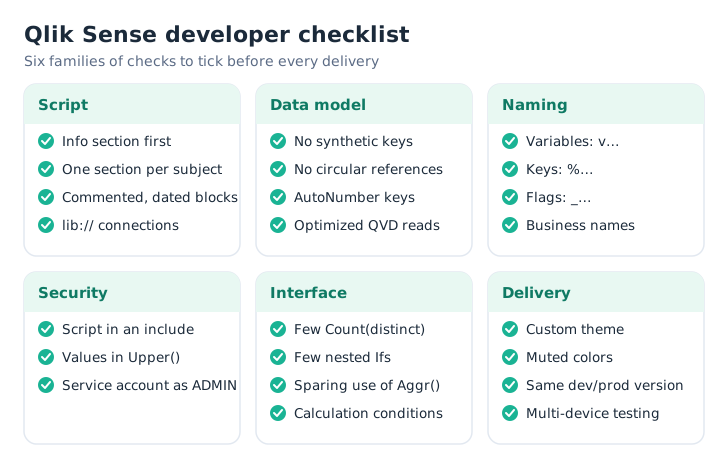
The checklist at a glance, by family of checks.
Script: code someone else can take over
- The first section of the script is an information section: purpose of the app, sources, change history.
- Each subject area (sales, customers, calendar…) has its own section in the data load editor; sections play the role of QlikView tabs.
- Every code block starts with a comment, and every change is dated.
- All sources go through data connections (
lib://…). They replace the UNC paths and the ODBC strings that QlikView developers isolated in include files or in the hidden script, which does not exist in Qlik Sense. - The reload log is available and read: it is the counterpart of QlikView’s “Generate Logfile” option.
- Flags are numeric (1/0) wherever possible.
Data model
- No synthetic keys and no circular references (QlikView’s “loops”): the data model viewer flags them.
- Granularity is right: the grain of each table matches the expected analyses.
- QVDs are used wherever possible, and they are read in optimized mode.
- Tables join on integers; large concatenated keys are replaced with
AutoNumber(). - System keys and technical timestamps are removed from the model; a useful timestamp is split into date and time.
- Unused fields are removed.
- Concatenated dimension fields are broken into distinct fields.
- Unneeded snowflaked tables are consolidated; very large models do without link tables.
// Optimized QVD read: no transformation here
Orders_tmp:
LOAD * FROM [lib://Sales_QVD/Orders.qvd] (qvd);

Orders:
LOAD
    AutoNumber(Company & '_' & OrderNbr, 'Order')  as %OrderKey,
    CustNo                                         as "Customer Nbr",
    Date(Floor(OrderTimestamp))                    as "Order Date",
    Time(Frac(OrderTimestamp))                     as "Order Time",
    If(InYearToDate(OrderTimestamp, Today(), 0), 1, 0) as _YTDFlag,
    Amount
RESIDENT Orders_tmp;

DROP TABLE Orders_tmp;
Naming
The original conventions apply as they are: a prefix is enough to tell what you are dealing with.
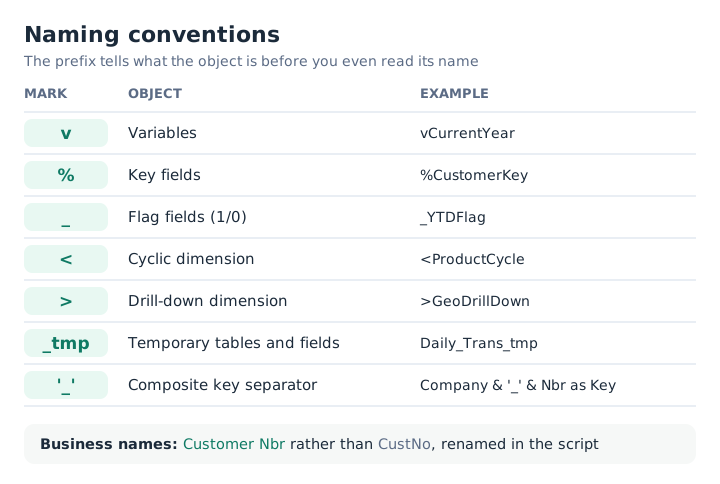
The checklist prefixes, unchanged since QlikView.
- Conventions cover tables, fields and variables.
- Variables prefixed with
v, key fields with%, flags with_, temporary tables and fields suffixed with_tmp. - The parts of a composite key are separated by
_. - The
<(cycle group) and>(drill-down group) prefixes apply, in Qlik Sense, to the names of cyclic and drill-down master dimensions. - Fields carry business names:
Customer Nbrrather thanCustNo. - Renaming happens in the script, not in each chart.
Security: Section Access
- The security script lives in an include file, called with
$(Must_Include=…), which makes the reload fail if the file is missing. Upper()is applied to Section Access fields and to the reduction values on the data side: Qlik Sense compares in uppercase.- The reload service account is listed as
ADMIN: in Client-Managed,INTERNAL\SA_SCHEDULERreplaces the Publisher service account.
// section_access.qvs, called from the main script with:
// $(Must_Include=lib://Security/section_access.qvs);
Section Access;
Access:
LOAD * INLINE [
ACCESS, USERID, REGION
ADMIN, INTERNAL\SA_SCHEDULER, *
];
Concatenate (Access)
LOAD
    'USER'         as ACCESS,
    Upper(UserId)  as USERID,
    Upper(Region)  as REGION
FROM [lib://Security/users.qvd] (qvd);
Section Application;
On the data side, the reduction field is loaded the same way: Upper(Region) as REGION.
Interface performance
- Few
Count(distinct …), few nestedIfs, few string comparisons. - Set analysis kept in check on large fact tables;
Aggr()avoided when possible. - No
Ifin calculated dimensions. - No time functions such as
InMonth()in expressions: a flag computed in the script does the same job. - Few visualizations per sheet, and few pivot tables in very large apps.
- A calculation condition on large charts.
- Common expressions are centralized: in Qlik Sense, master measures and dimensions often take over from expression variables.
Design and delivery
- Color is used for contrast and focus; everything else is neutral and muted.
- A custom theme carries the brand, and formatting is consistent across sheets and objects.
- The most used selections sit at the top, the least used at the bottom.
- The display suits users’ screen resolutions and is tested on their devices (browsers, mobile).
- In Client-Managed, the development version matches production. In SaaS, the question does not arise.
Tuning an existing app
The original checklist ended with a tuning method that still holds:
- Reduce rows: keep only the history depth that is really needed.
- Reduce columns: find unused fields, then remove them with
DROP FIELDstatements in the very last section of the script. QlikView’s DocumentAnalyzer has a community counterpart, Qlik Sense Document Analyzer; in Qlik Cloud, the App Analyzer monitoring app provides comparable information. - Reduce distinct values: timestamps and system keys first. The data model viewer shows that count for each field.
- Convert to numeric the fields compared in expressions, such as
If(ClientType = 'Direct', …). - Simplify the model: consolidate snowflakes towards a star schema.
- Simplify the app: fewer sheets, fewer objects per sheet.
- Run the full checklist again.
What no longer applies
Qlik Sense has no macros, no hidden script and no QlikView-style “Show Frequency” option on list boxes. QlikView Optimizer gives way to the tools mentioned above. Table columns can be filtered natively, which makes the drop-down instruction moot. Publisher is gone, and its abbreviations (APR, JOB, SDF, TSK, DSR) with it: reloads are QMC tasks in Client-Managed and scheduled reloads in SaaS. Only the DEV, TST and PRD environment prefixes remain useful, carried over to the names of streams, spaces and tasks.
Key takeaways
- A clean model first. No synthetic keys, no loops, no unused fields: everything else depends on it.
- A script that reads well. Information section, one section per subject, dated comments.
- Names that speak.
v,%,_prefixes,_tmpsuffix, business names set in the script. - Security in a single file. Mandatory include,
Upper()everywhere, service account asADMIN. - Performance is prepared in the script. Numeric flags, integer keys, fewer distinct values.
Source
QV Developer Checklist, QlikView development checklist (2017), internal document inspired by Qlik community practices; Qlik Sense update: HeyData.