
· By HeyData team
Series: Designing Talend Jobs: Dale Anderson’s best practices, revisited for Studio 8 · article 1 of 1
The foundations of a Talend project: principles, guidelines and conventions
“What is the best way to write this Job?” Every Talend developer asks the question, from beginners to the most experienced. Studio leaves a lot of freedom: the canvas accepts any layout, each component has dozens of options, and two developers rarely solve the same problem the same way. On a team project, that freedom soon becomes a cost. Jobs do not look alike, reviews are slow, and every hand-over means rediscovering the author’s choices.
Before talking about components, the team must therefore agree on common rules. That is where Dale Anderson’s series starts.
This article summarises and adapts to Talend Studio 8 parts 1 and 2 of “Talend Job Design Patterns and Best Practices” by Dale Anderson (Talend, 2015-2016). His advice remains a reference: we revisit it with today’s tools.
Principles to trade off
Dale Anderson starts from thirteen principles a good Job should respect: readability, writability, maintainability, functionality, reusability, conformity, pliability, scalability, consistency, efficiency, compartmentation, optimisation and performance. None of them is new. Their value lies in the reminder that they contradict each other.
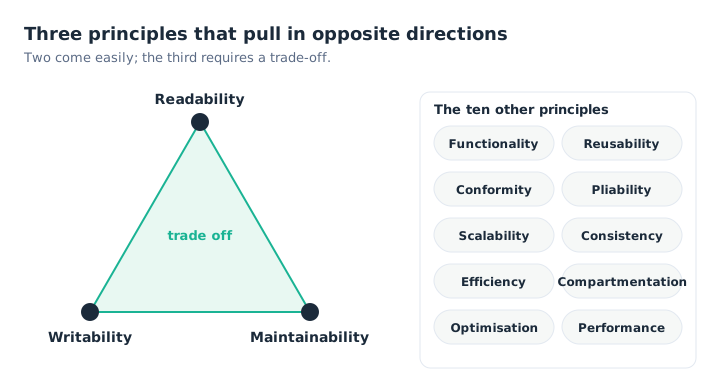
The first three principles compete: two are easy to hold, the third requires a choice.
The first three are the clearest example. A Job written quickly is rarely the most readable; a finely split Job, and therefore an easy one to maintain, takes longer to write. Two come easily, the third is negotiated. The exercise the author suggests is useful for a team: rank these principles by importance for your project. The ranking for a real-time flow will not be that of a nightly warehouse load, and that is precisely what needs to be made explicit.
Guidelines, not standards
Two pitfalls threaten a team. The first is the rigid standard, which does not foresee special cases and ends up bypassed. The second is the lack of rules, where each developer works their own way. Dale Anderson argues for a middle path: a development guidelines document, adopted by the whole team, that sets landmarks without freezing everything.
He suggests a three-part outline:
- the methodologies, that is how to build: data modelling, development life cycle (waterfall or agile), requirements management, error handling and auditing, data governance;
- the technologies, that is with which tools: infrastructure, databases, encryption, web services, external systems;
- the best practices, that is what to do and when: environments, naming conventions, logging, return codes, contexts, Job layout, parallelism, version control, testing, deployment, security and scheduling.
Three documents usefully complement this guide: a library of reusable modules (Joblets, routines, context groups), a data dictionary and a description of the data access layer. All of it should stay short and up to date: a ten-page guide that everyone reads beats a manifesto that nobody opens.
Good habits, one at a time
Rather than imposing every rule at once, the author recommends building habits one by one. Start with the simplest: give every component a label. A tMap_3 says nothing; “Compute discount” says it all. Once that reflex is in place, move on to filing Jobs in meaningful folders, then to a common log message format, and so on.
A useful shortcut today: the Qlik Talend documentation publishes a naming conventions guide (Object Naming Conventions) and a development life cycle best practices guide. They provide a base to adapt rather than reinvent.
Organising the repository
Studio’s Repository panel holds every object in the project. It deserves the same care as the code. Dale Anderson insists on three sections that are too often neglected:
- context groups, to be created in the repository rather than in each Job, so they can be reused everywhere. We come back to them in the article on contexts;
- metadata: database connections, file structures and generic schemas, to be defined once and reused;
- documentation: Studio generates HTML documentation of the project in a few minutes. Publish it to the team once the work is done.
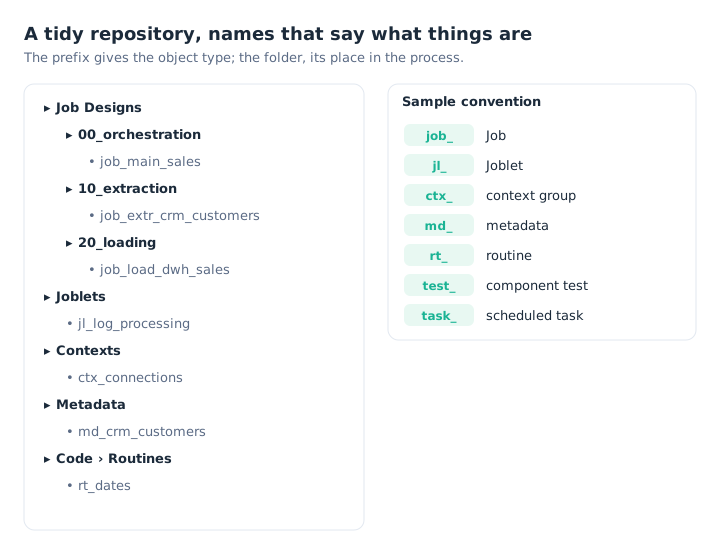
The prefix says what the object is; the numbered folder says where it sits in the process.
For names, the golden rule is consistency. Our example uses the prefixes suggested by the Qlik Talend development life cycle guide (job_, test_, task_) and completes them for Joblets, contexts, metadata and routines. Dale Anderson suggests, for instance, md_ for metadata: by default, Studio names them all “metadata”, which makes the code unreadable. Numbering folders (00_, 10_, 20_) sorts them in processing order rather than alphabetically.
One detail matters more than it seems: a Job’s name becomes the name of a Java class in the generated code. Avoid spaces and accented characters, and keep it short.
What has changed since 2016
- Talend Open Studio has not been distributed since 2024: the series is now aimed at Talend Studio 8 users, with Qlik Talend Cloud or Talend Administration Center.
- The Qlik Talend development life cycle guide now sets a figure: avoid more than twenty components per Job, and leave orchestration to a parent Job. That is the subject of the next article.
- A Job’s internal versions (major and minor numbers) do not replace Git. We cover this in the article on industrialisation.
Key takeaways
- Trade off, don’t maximise. Readability, writability and maintainability conflict: decide as a team what comes first.
- Guidelines, not standards. A short guide, adopted by all, that leaves room for special cases.
- One habit at a time. Start with a label on every component.
- One prefix per object type.
job_,jl_,ctx_,md_,rt_: the name says what the object is. - A tidy repository. Numbered folders, shared contexts and metadata, published documentation.
- Consistency first. An imperfect convention followed by all beats a perfect one ignored.
Try it in Talend Studio
A ten-minute exercise, in a test project:
- In the repository, under Job Designs, create the folders
00_orchestration,10_extractionand20_loading. - In
10_extraction, create a Jobjob_extr_demo: atRowGeneratorproducing ten rows, linked to atLogRow. - Give each component a label: select it, View tab, Label format field. For example “Generate 10 customers” and “Display”.
- Run the Job, then open the Code tab: the Job’s name has become a Java class.
- Right-click the Job and choose Generate Doc As HTML: the documentation produced uses your labels.
Sources
- Dale Anderson, Talend Job Design Patterns and Best Practices, part 1 and part 2, Talend (archived version).
- Qlik Talend help: Object Naming Conventions and Software Development Lifecycle Best Practices Guide.
All credit for the original content goes to Dale Anderson; the adaptation to Talend Studio 8 and any errors are HeyData’s. This article is part of our series on Talend Job design best practices: explore the series.