
· By HeyData team
Series: Henric Cronström’s Technical Briefs, revisited for Qlik Sense · article 7 of 7
Incremental load with QVD files in Qlik Sense: the three cases
Reloading an entire transactional table on every run means reading the same unchanged rows again and again. An incremental load asks the database only for what has changed and takes the rest from a QVD file. Everything depends on what the source lets you detect: we distinguish three cases, each with its own script.
This article summarises the Qlik presentation “Incremental Load using QVD files” (2017, author not credited) and adapts it to Qlik Sense. A reference we revisit with today’s tools.
The problem
Querying a production database from Qlik is expensive. The query is slow, it puts load on the source server, and its duration grows with the table. Yet from one reload to the next, most rows are identical.
A QVD file is the opposite: it reads very fast, even with millions of rows. The idea behind incremental load (also called differential or delta load) is to combine the two:
- read only the new or changed rows from the database;
- read the history from the QVD;
- store the result in a new QVD, which becomes the history for the next run.
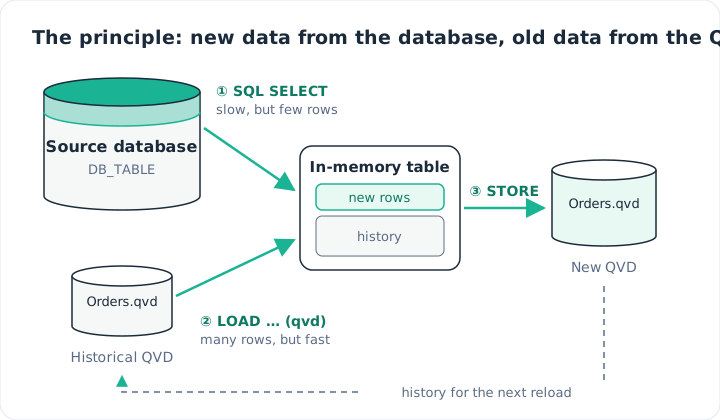
New data comes from the database, old data from the QVD, and everything goes back into a QVD.
This mechanism is built table by table. There is no global switch: each large table gets its own script block.
Three cases, depending on the source
The right technique depends on the changes the source undergoes and on what it exposes to track them. With a database, three situations arise.
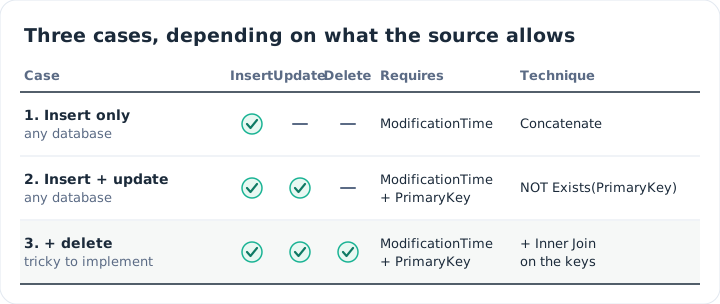
The more changes the source allows, the more the script has to do.
Case 1: insert only
Here, the database receives new rows but never modifies or deletes any. Any database will do, on one condition: a timestamp field, here ModificationTime.
The script reads the rows that appeared since the last run, appends the history from the QVD, then stores everything again:
LIB CONNECT TO 'Sales_DB';

Orders:
SQL SELECT PrimaryKey, X, Y
FROM dbo.Orders
WHERE ModificationTime >= '$(vLastExecTime)'
  AND ModificationTime <  '$(vThisExecTime)';

Concatenate (Orders)
LOAD PrimaryKey, X, Y
FROM [lib://QVD_Store/Orders.qvd] (qvd);

STORE Orders INTO [lib://QVD_Store/Orders.qvd] (qvd);
The upper bound vThisExecTime deserves attention. Otherwise, a row written to the database during the reload would be picked up twice, or not at all. By closing the window at the start time, each row falls into exactly one interval.
On the Qlik Sense side, paths go through lib:// data connections, never absolute file paths. Here, QVD_Store is a folder connection in Client-Managed. In Qlik Cloud, the QVD lives in a space, and the path takes the form lib://SpaceName:DataFiles/Orders.qvd. Finally, the date literal format depends on the database you query: more on this below.
Case 2: insert and update
As soon as existing rows can be modified, the QVD holds outdated versions. You need a primary key to discard them. The fix is a single clause:
Concatenate (Orders)
LOAD PrimaryKey, X, Y
FROM [lib://QVD_Store/Orders.qvd] (qvd)
WHERE NOT Exists(PrimaryKey);
Order is decisive. Recent rows are loaded first from the database. When the QVD is read next, Exists(PrimaryKey) spots the keys already in memory and skips their old version. A modified row therefore appears only once, in its latest state.
Case 3: insert, update and delete
This is the trickiest case, and the presentation flags it as such. A row deleted in the database shows up in no incremental query: nothing lets you see it disappear. You must therefore compare the result with the keys still present in the source.
An inner join does the job. It reads only the key column, across the whole table:
Inner Join (Orders)
SQL SELECT PrimaryKey FROM dbo.Orders;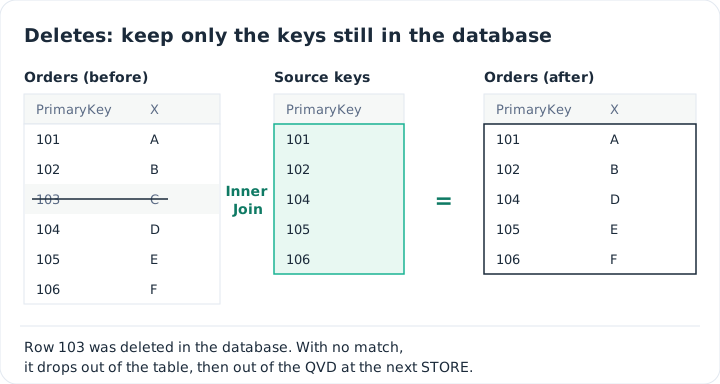
With no match in the source, the deleted row drops out of the table.
The presentation also gives a variant for databases that flag deletions instead of erasing the row. First load the list of deleted keys under a different field name, then exclude them when reading the QVD:
DeletedKeys:
SQL SELECT PrimaryKey AS Deleted
FROM dbo.Orders
WHERE DeletionFlag = 1;

// ... incremental SELECT into Orders, as in case 1 ...

Concatenate (Orders)
LOAD PrimaryKey, X, Y
FROM [lib://QVD_Store/Orders.qvd] (qvd)
WHERE NOT Exists(PrimaryKey)
  AND NOT Exists(Deleted, PrimaryKey);

DROP TABLE DeletedKeys;
Remembering the last run
Everything relies on a reliable timestamp of the last successful run. The presentation captures it at the start of the script with ReloadTime() and commits it only when there is no error, via ScriptErrorCount. If a run fails, the next window starts from the same point and nothing is lost.
In Qlik Sense, we store this value in a small QVD, read back at the next reload. The complete script becomes:
LIB CONNECT TO 'Sales_DB';

SET vQvd     = lib://QVD_Store/Orders.qvd;
SET vQvdExec = lib://QVD_Store/Orders_LastExec.qvd;

LET vThisExecTime = Timestamp(ReloadTime(), 'YYYY-MM-DD hh:mm:ss');

// Incremental load only if the history QVD and the last execution time both exist
IF Not IsNull(QvdCreateTime('$(vQvd)')) AND Not IsNull(QvdCreateTime('$(vQvdExec)')) THEN

  LastExec:
  LOAD LastExecTime
  FROM [$(vQvdExec)] (qvd);
  LET vLastExecTime = Peek('LastExecTime', 0, 'LastExec');
  DROP TABLE LastExec;

  Orders:
  SQL SELECT PrimaryKey, X, Y
  FROM dbo.Orders
  WHERE ModificationTime >= '$(vLastExecTime)'
    AND ModificationTime <  '$(vThisExecTime)';

  Concatenate (Orders)
  LOAD PrimaryKey, X, Y
  FROM [$(vQvd)] (qvd)
  WHERE NOT Exists(PrimaryKey);

  Inner Join (Orders)
  SQL SELECT PrimaryKey FROM dbo.Orders;

ELSE

  // First run, or QVD lost: full extraction from the source
  Orders:
  SQL SELECT PrimaryKey, X, Y
  FROM dbo.Orders;

END IF

IF ScriptErrorCount = 0 THEN
  STORE Orders INTO [$(vQvd)] (qvd);

  LastExec:
  LOAD '$(vThisExecTime)' AS LastExecTime
  AUTOGENERATE 1;
  STORE LastExec INTO [$(vQvdExec)] (qvd);
  DROP TABLE LastExec;
END IF
Two notes for Qlik Sense. By default, a script error already stops the reload; the ScriptErrorCount test mainly protects scripts that relax this behaviour with SET ErrorMode = 0;. Also, the script handles the first load itself. The presentation did not cover it: we add it. QvdCreateTime() returns NULL when the file does not exist. If the history or the timestamp is missing (first run, QVD deleted or moved), the script reads the whole source table, with no WHERE, then creates both QVD files. Later runs switch to incremental. This full load needs neither Concatenate nor Inner Join: reading everything already reflects deletions. Nor is it bounded by ModificationTime, so rows where that field is empty are not lost. A row modified during the reload is simply read again next time, without duplicates thanks to NOT Exists(PrimaryKey). Finally, the paths are grouped into two variables: a single place to adapt, for example to lib://Space:DataFiles/… in Qlik Cloud.
The reload then runs at regular intervals: through a task in the QMC in Client-Managed, or through an app reload schedule in Qlik Cloud.
Passing the date to the database unambiguously
The incremental query compares ModificationTime with a date built by Qlik. Written as a plain string, '2026-10-09 14:30:00', that date is interpreted by the database according to its session settings: language, DATEFORMAT, NLS_DATE_FORMAT, DateStyle. The same script can then work on one server and fail, or worse filter the wrong rows, on another.
The rule has two parts.
- On the Qlik side, the variable is always formatted the same way:
Timestamp(…, 'YYYY-MM-DD hh:mm:ss'), with 24-hour hours (hhin Qlik). The script above already does this. - On the database side, the format is not left to guesswork: it is declared in the query, using the syntax of each DBMS.
// PostgreSQL
WHERE ModificationTime >= TIMESTAMP '$(vLastExecTime)'

// MySQL / MariaDB
WHERE ModificationTime >= STR_TO_DATE('$(vLastExecTime)', '%Y-%m-%d %H:%i:%s')

// SQL Server
WHERE ModificationTime >= CONVERT(datetime2, '$(vLastExecTime)', 120)

// Oracle
WHERE ModificationTime >= TO_TIMESTAMP('$(vLastExecTime)', 'YYYY-MM-DD HH24:MI:SS')
A few details:
- PostgreSQL and Oracle both accept the standard
TIMESTAMP '2026-10-09 14:30:00'literal, which does not depend on session settings. With Oracle,TO_TIMESTAMPwith an explicit mask remains the most common choice, and it does not depend onNLS_DATE_FORMAT. - MySQL and MariaDB natively read
'YYYY-MM-DD hh:mm:ss'strings;STR_TO_DATEsimply makes the format explicit. - With SQL Server, a
'YYYY-MM-DD hh:mm:ss'string compared with adatetimecolumn can be read with day and month swapped when the session language is French. Style120ofCONVERTfixes theyyyy-mm-dd hh:mi:ss24-hour format, whatever the language.
The upper bound vThisExecTime is written the same way. For SQL Server, the query in the complete script becomes for example:
Orders:
SQL SELECT PrimaryKey, X, Y
FROM dbo.Orders
WHERE ModificationTime >= CONVERT(datetime2, '$(vLastExecTime)', 120)
  AND ModificationTime <  CONVERT(datetime2, '$(vThisExecTime)', 120);
One last thing to check: the time zone. ReloadTime() returns the Qlik engine’s time, and ModificationTime the database’s. If the two clocks are not in the same time zone, the read window is shifted by the difference. Check it once and for all when setting things up.
Key takeaways
- Read little, read fast. The database supplies only new or changed rows; the QVD supplies the history.
- Start from the source. What the database lets you detect (insert, update, delete) decides the script.
- Two essential fields.
ModificationTimeto bound the read,PrimaryKeyas soon as rows change. - Order matters. Load from the database first, then from the QVD with
WHERE NOT Exists(PrimaryKey). - Deletes are caught with a join. An
Inner Joinon the keys still in the database removes vanished rows. - No STORE on failure. The QVD and the timestamp are rewritten only after an error-free reload.
- Plan the first load. With no QVD or timestamp, the script reads the whole source, then creates the history.
- Declare the date format.
CONVERT,TO_TIMESTAMP,STR_TO_DATEorTIMESTAMP: the database guesses nothing.
Source
“Incremental Load using QVD files”, Qlik presentation, author not credited, 2017.
All credit for the original content goes to its authors; the adaptation to Qlik Sense and any errors are HeyData’s own. This article is part of our technical briefs: explore the series and its other topics.