
Draft: this article is not published. It is not listed on the blog and not indexed.
· By HeyData team
Series: Designing Talend Jobs: Dale Anderson’s best practices, revisited for Studio 8 · article 4 of 7
Contexts, variables and routines in Talend: hard-code nothing
A Job that contains a hard-coded server name, password or file path only works in one place. Moving it from development to production means changing it, and therefore testing it again, with the risk of forgetting a value. Talend offers several ways to take these values out of the code: contexts for configuration, globalMap for values computed during the run, routines for reusable logic.
This article summarises and adapts to Talend Studio 8 parts 2, 3 and 4 of “Talend Job Design Patterns and Best Practices” by Dale Anderson (Talend, 2016). His advice remains a reference: we revisit it with today’s tools.
One context group, one value per environment
A context variable is a Job parameter, read at run time as context.name. It can be created in the Job itself (Built-In) or in a repository context group. Dale Anderson clearly recommends the second option: the group is reused in every Job, and even in other projects if it lives in a reference project.
In that group, create one context per environment: DEV, TEST, PROD, plus a sandbox and acceptance if needed. Each one holds its own values for the same variables. The author advises deleting the “Default” context created by Studio and making DEV the default context: this prevents a carelessly launched Job from targeting production.
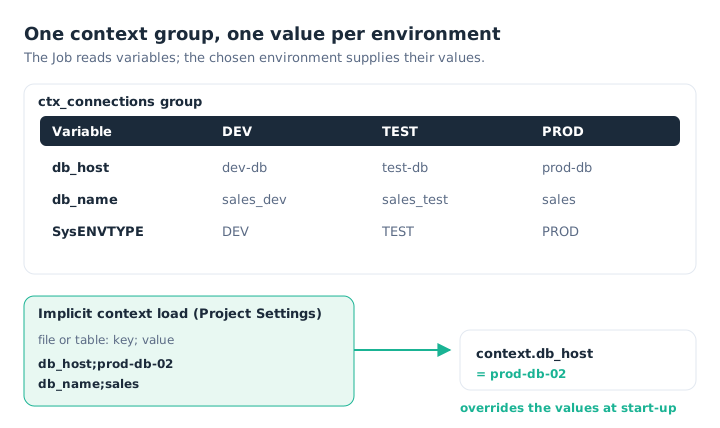
The Job reads context.db_host; the chosen environment, or a file loaded at start-up, supplies its value.
A tip from the author: add a SysENVTYPE variable holding the environment’s name. The Job can then adapt its behaviour with a simple condition, for example sending an alert only in production:
if ("PROD".equals(context.SysENVTYPE)) {
    // send the alert
}
Loading contexts at start-up
The values of a context group are embedded in the Job at build time. To manage them outside the Job, in a file or a table, Talend offers two ways.
The tContextLoad component reads key-value pairs and overrides the values of the Job’s variables. Placed in a tPreJob, it initialises the Job before any processing. Its Die on error option stops the Job if an expected variable is missing, which avoids working with an incomplete configuration. The reverse component, tContextDump, writes the current values to a file or a table.
Implicit context load does the same without a component. It is set in Project Settings › Job Settings › Implicit Context Load: you choose a file or a table, the separator, and the message level (warning, error or info) when a variable is loaded without existing in the context, or the other way round. It can be applied to all new Jobs, or ticked Job by Job.
This separation also helps security: production credentials stay in a protected file or table, not in the Job.
globalMap: passing a value from one subjob to another
Contexts carry configuration. For a value computed during the run, use globalMap, a key-value table shared by the whole Job.
The tSetGlobalVar component stores a value in it; you read it back later with globalMap.get("key"), cast to the right type. Dale Anderson’s example is an incremental load. A first subjob reads the date of the last update (MAX(date)) and stores it in globalMap. A second subjob uses it in the WHERE clause of its query to read only new rows.
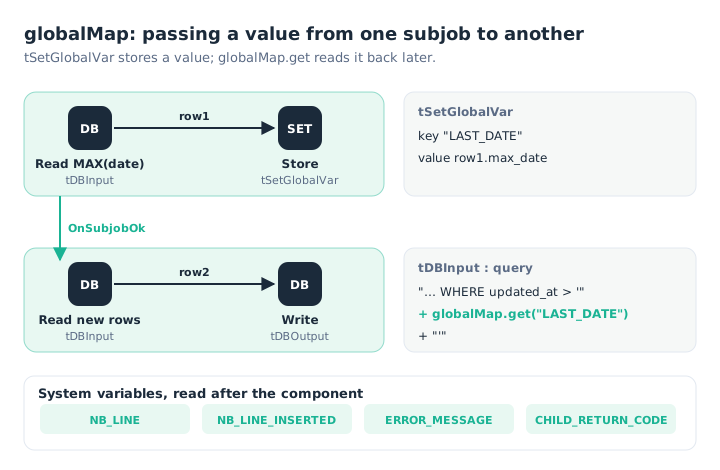
The first subjob stores the date; the second reads it back in its query.
The second tDBInput’s query reads as follows. The date is put back into the format the database expects with TalendDate.formatDate(), because globalMap.get() returns a Java object:
"SELECT * FROM sales WHERE updated_at > '"
    + TalendDate.formatDate("yyyy-MM-dd HH:mm:ss", (java.util.Date) globalMap.get("LAST_DATE"))
    + "'"
Order matters: the value only exists in globalMap once the first subjob has finished. Hence the OnSubjobOk link between the two.
Component system variables
Studio also stores system variables in globalMap, filled by the components themselves and available as soon as the component has finished. The name combines the component’s unique name and the variable:
NB_LINE,NB_LINE_OK,NB_LINE_REJECT: rows processed, accepted and rejected;NB_LINE_INSERTED,NB_LINE_UPDATED,NB_LINE_DELETED: rows written by an output component;ERROR_MESSAGE,DIE_MESSAGE,WARN_MESSAGE: the last error message;CHILD_RETURN_CODE,DIE_CODE,WARN_CODE: return codes.
Integer rows = (Integer) globalMap.get("tDBOutput_1_NB_LINE_INSERTED");Studio’s Outline view lists the variables available for each component of the Job: it is the safest way to find their exact names.
Routines: reusable Java
When no component fits, you can write Java in a tJava or a tJavaRow. If the same code comes back in several Jobs, it is better to turn it into a routine: a repository Java class whose methods can be called anywhere, in a tMap, a tJava or an expression.
Talend provides system routines that everyone uses without thinking, such as TalendDate.getCurrentDate(), Numeric.sequence("s1", 1, 1) or Relational.ISNULL(value). User routines are created under Code › Routines. A generic, well-named and commented routine is one of the best investments in a project. Dale Anderson points out that each method’s comment appears as help when you select it in the expression editor: it deserves care.
package routines;

public class rt_dates {
    /**
     * First day of the month of the given date.
     * {talendTypes} Date
     * {Category} rt_dates
     * {example} firstDayOfMonth(new java.util.Date())
     */
    public static java.util.Date firstDayOfMonth(java.util.Date d) {
        if (d == null) return null;
        java.util.Calendar c = java.util.Calendar.getInstance();
        c.setTime(d);
        c.set(java.util.Calendar.DAY_OF_MONTH, 1);
        return c.getTime();
    }
}
What has changed since 2016
- Implicit context loading is still set in the project settings. With a Remote Engine, the context file must be present on the engine’s server.
- Studio 8 distinguishes global routines, shared by the whole project, from Custom Routine Jars. These bundle routines with their dependencies, and each Job declares the ones it uses. Dependencies are more explicit and library conflicts rarer.
Key takeaways
- Nothing hard-coded. Servers, paths and credentials go through contexts.
- Shared context groups. One context per environment, DEV by default, no more “Default”.
- An environment variable.
SysENVTYPElets the Job adapt at run time. - External values.
tContextLoador implicit loading read a file or a table at start-up. - globalMap for computed values.
tSetGlobalVarstores,globalMap.getreads back after an OnSubjobOk. - Commented routines. The comment becomes the expression editor’s help.
Try it in Talend Studio
To see a context overridden at start-up:
- In the repository, create a context group
ctx_demowith a String variablemessage, and two contexts: DEV (“Hello DEV”) and PROD (“Hello PROD”). - Create a Job, Contexts tab, and import the
ctx_demogroup. - Add a
tJava:System.out.println(context.message);. Run it with DEV, then with PROD. - Create a file
context.txtcontaining the linemessage;Hello file. - Add a
tPreJoblinked to atFileInputDelimited(separator;, schemakey,value), itself linked to atContextLoad. Run it: thetJavanow prints “Hello file”.
Sources
- Dale Anderson, Talend Job Design Patterns and Best Practices, part 2, part 3 and part 4, Talend (archived version).
- Qlik Talend help: Context settings, Job Settings, Managing user routines and Creating custom routine jars.
All credit for the original content goes to Dale Anderson; the adaptation to Talend Studio 8 and any errors are HeyData’s. This article is part of our series on Talend Job design best practices: explore the series.