
Draft: this article is not published. It is not listed on the blog and not indexed.
· By HeyData team
Series: Designing Talend Jobs: Dale Anderson’s best practices, revisited for Studio 8 · article 5 of 7
Dynamic schemas and SQL in Talend: metadata, Dynamic and CDC
A Talend Job describes its data with a schema: the list of columns, their type, their length. Copied from component to component, that schema soon becomes a trap: add a column to a table, and ten Jobs need editing. Talend offers several ways to describe the data only once, or even not to describe it at all and discover it at run time.
This article summarises and adapts to Talend Studio 8 parts 2, 3 and 4 of “Talend Job Design Patterns and Best Practices” by Dale Anderson (Talend, 2016). His advice remains a reference: we revisit it with today’s tools.
Schemas defined once, in the repository
The repository’s Metadata section gathers reusable descriptions: database connections and their table schemas, file formats (delimited, positional, XML, JSON, Excel…), web services, LDAP directories. A component attached to one takes its schema from the repository; if that schema changes, Studio offers to propagate the change to the Jobs that use it.
Among this metadata, Dale Anderson highlights generic schemas. They are tied to no source: you cut them to fit a need. Two cases come up often:
- enriching: the
accountstable has 12 columns, the Job’s flow carries 16, 4 of them computed. A 16-column generic schema describes that flow; - reducing: a 100-column table of which the Job uses only 10. The generic schema keeps only those, and so does the query.
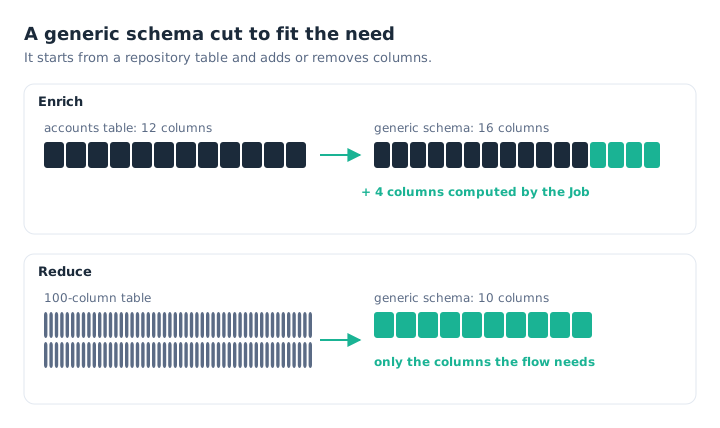
The generic schema describes the Job’s flow, not necessarily the table.
His advice: generic schemas everywhere, except perhaps for a single-column structure, simpler to declare in the component. And an explicit name: by default, Studio names every schema “metadata”, hence the md_ convention seen in the first article.
A query built at run time
The Query field of a tDBInput accepts a Java expression, not just fixed text. You can therefore assemble the query from context variables, set earlier in the Job, for example in a tJava:
"SELECT " + context.sqlCOLUMNS + " FROM " + context.sqlFROM + " WHERE " + context.sqlWHEREThis is not dynamic SQL in the database sense, but a query generated by the Job. Two precautions. First, plan the spaces between the pieces, or the words run together. Second, never concatenate a value typed by a user or read from an external file, which would open the door to SQL injection. For a simple filter value, a prepared statement (Use PreparedStatement in the tDBRow advanced settings) is safer.
Dynamic schemas
Copying a hundred tables from one database to another with one Job per table makes no sense. The dynamic schema solves this case: a column of type Dynamic carries, at run time, all the source’s columns, whatever they are. The Job does not know them in advance.
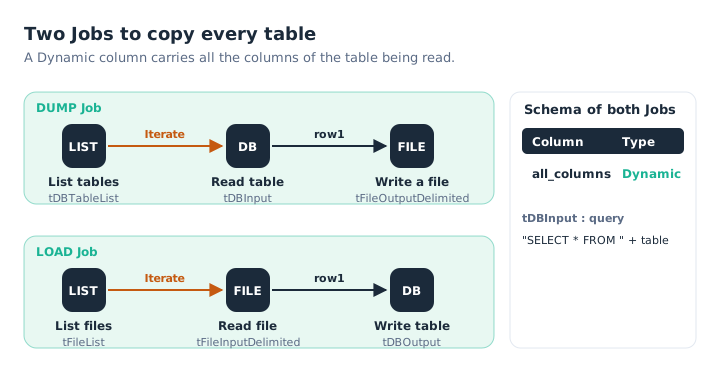
One Job dumps the tables to files, the other loads them back; neither knows the columns.
Dale Anderson describes this pattern with two Jobs. The first lists the tables, then, for each one, reads its rows into a Dynamic column and writes them to a file. The second does the reverse. He built the list of tables and columns himself by querying the database’s system tables (INFORMATION_SCHEMA), then passed it to the tSetDynamicSchema component, required to write a positional file. The t<DB>TableList and t<DB>ColumnList components, for example tMysqlTableList, do the same work without knowing those system tables.
With a Dynamic column, a tDBInput query must contain SELECT *: the database supplies the list of columns. The schema must also be declared in the component (Built-In), not taken from the repository.
The other SQL components
Not every query reads rows. Three components complete the palette:
tDBRowruns a query that returns no result:TRUNCATE,CREATE INDEX,DROP TABLE;tDBSPcalls a stored procedure;tMysqlLastInsertId, and its equivalents for other databases, read back the identifier generated by the last insert.
CDC: reading only what changed
Reloading a whole table every night is costly when only a few rows have moved. CDC (Change Data Capture) captures inserts, updates and deletes in the source, so that the Job reads only the changes since its last run.
In Studio, CDC relies on a publish-and-subscribe model. The default mode uses triggers placed on the source tables, which record the changes in tracking tables; the t<DB>CDC components, such as tMysqlCDC or tOracleCDC, then read them. For Oracle, Studio also offers the XStream mode, and the redo and archive log mode Dale Anderson mentioned. Setting it up is demanding: rights on the source database, tracking tables, subscribers. It is decided upfront and documented in the development guide.
What has changed since 2016
- Dynamic schemas and CDC were reserved for the commercial editions; since Talend Open Studio ended, on 31 January 2024, those are the only ones.
- Studio offers generic database components (
tDBInput,tDBOutput,tDBRow,tDBSP,tDBTableList) that are set up for a given database. The database-specific components still exist. - The redo and archive log CDC mode is deprecated for Oracle, as is Oracle 11; XStream remains available for Oracle 12 and later.
Key takeaways
- Schemas in the repository. Described once, propagated to the Jobs that use them.
- Generic schemas everywhere. Cut to fit the flow: enriched or reduced.
- Carefully assembled queries. Spaces between the pieces, no external value concatenated.
- Dynamic for the unknown. One column carries every column, with a
SELECT *. - The right SQL components.
tDBRow,tDBSP,LastInsertIdfor what reads no rows. - CDC takes preparation. An architecture to design and document before the first Job.
Try it in Talend Studio
To see a Dynamic column absorb a change of structure:
- Create a file
customers.csvwith a header and two rows:id;namethen1;Smithand2;Jones. - Create a Job with a
tFileInputDelimited: separator;, Header set to 1, and a single-column schemaall_columnsof type Dynamic. - Link it to a
tLogRow, then run it: both columns are displayed. - Add a
citycolumn to the file (id;name;city,1;Smith;Leeds,2;Jones;Bristol) and run it again, without touching the Job: the third column appears.
Sources
- Dale Anderson, Talend Job Design Patterns and Best Practices, part 2, part 3 and part 4, Talend (archived version).
- Qlik Talend help: Generic schemas, Dynamic schema, tSetDynamicSchema, generic database components and Change Data Capture.
All credit for the original content goes to Dale Anderson; the adaptation to Talend Studio 8 and any errors are HeyData’s. This article is part of our series on Talend Job design best practices: explore the series.