
Draft: this article is not published. It is not listed on the blog and not indexed.
· By HeyData team
Series: Designing Talend Jobs: Dale Anderson’s best practices, revisited for Studio 8 · article 6 of 7
Talend Job performance: memory, lookups and parallelism
A Job that handles a thousand rows in development can collapse under ten million in production. Most of the time, the code is not to blame: memory runs out, a lookup is loaded in full, or parallelism saturates the server. A Talend Job’s performance depends less on its expressions than on a few settings people forget to make.
This article summarises and adapts to Talend Studio 8 parts 2, 3 and 4 of “Talend Job Design Patterns and Best Practices” by Dale Anderson (Talend, 2016). His advice remains a reference: we revisit it with today’s tools.
Memory: a setting to make, not to suffer
A Talend Job is a Java program: it runs in a JVM whose memory is capped by the -Xmx argument. The default values suit a trial, rarely a real workload. Dale Anderson lists the questions to ask: how many rows and columns, how many lookups in the tMap components, how many child Jobs and in which JVM, how many other Jobs run at the same time on the server, with how many cores and how much memory?
Memory is set at two levels:
- for all Jobs, in Window › Preferences › Talend › Run/Debug;
- for one Job, in the Run view, Advanced settings tab, Use specific JVM arguments box.
-Xms1024M
-Xmx4096M
By default, Studio runs Jobs with -Xms256M and -Xmx1024M. A larger -Xmx is not a universal fix: the server’s memory is shared between the Jobs running at the same time. The setting is decided with operations and written down in the development guide.
tMap lookups: memory or speed
The tMap joins the main flow to lookups. By default, each lookup is read in full and kept in memory before the first row goes through. It is fast, but a lookup of several million rows, or several lookups of that size, can exhaust the memory. The tMap offers three loading models:
- Load once reads the whole lookup once, into memory: the fastest, the hungriest;
- Reload at each row reads the lookup again for each row of the main flow, with that row’s key: very little memory, but one query per row;
- Reload at each row (cache) does the same, but keeps the rows already read: one query per new key.
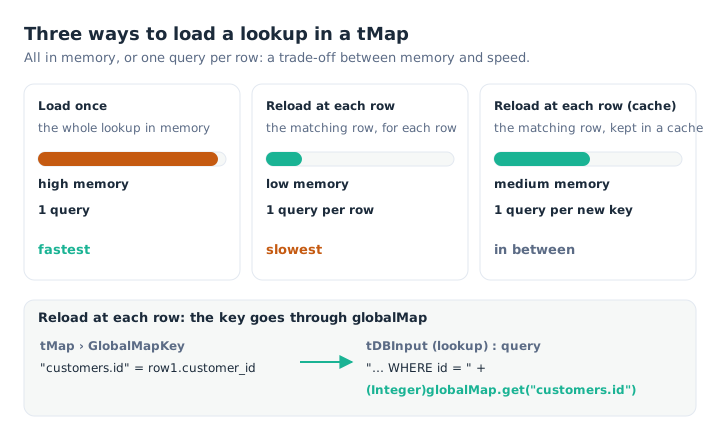
Load once holds everything in memory; Reload at each row queries the database row by row, with the key passed through globalMap.
The Reload at each row model needs a trick. In the tMap, Studio adds a GlobalMapKey field to the lookup, for example "customers.id", which you feed with the main flow’s key, row1.customer_id. The lookup component’s query reads it back from globalMap, in its WHERE clause:
"SELECT id, segment FROM customers WHERE id = " + (Integer)globalMap.get("customers.id")This model is only worth it when the main flow is small compared to the lookup: one query per row on a ten-million-row flow would be far slower than a single load.
A third option exists when the lookup must stay in Load once but exceeds the memory: the lookup’s Store temp data option, in the tMap, writes its data to disk instead of memory. The folder (Temp data directory path) and the size of the in-memory buffer (Max buffer size, 2,000,000 rows by default) are set in the tMap properties. This option cannot be combined with the Reload at each row (cache) model.
Parallelism, in measured doses
Talend offers several ways to run processing at the same time. They range from widest to finest, and can be combined:
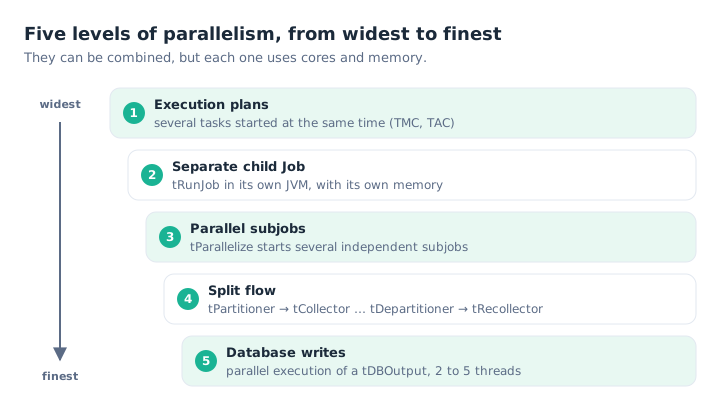
Each level multiplies the cores and memory used: add them up before stacking them.
- the scheduler’s execution plans start several tasks in parallel;
- a
tRunJobwith Use an independent process to run subjob starts the child in a separate JVM. It is not parallelism as such, but it isolates its memory; tParallelizestarts several independent subjobs at the same time, then waits for them to end before carrying on;tPartitioner,tCollector,tDepartitionerandtRecollectorsplit a flow into several threads, then put it back together. The documentation now advises letting Studio place them itself: right-click the starting component, Set parallelization;- database output components offer, in their advanced settings, parallel execution of the writes. Dale Anderson advises 2 to 5 threads: beyond that, the database saturates and the effect is reversed.
He advised against placing several unrelated flows in one Job to run them together, however: separate Jobs are better. And he stressed the rule that applies to every level: know each Job’s memory and core use before running several of them.
Iterations: row by row, when needed
A Row link carries a whole dataset, processed in one go by the subjob. Some processing must instead be repeated for each row: reading one file per name found, calling a child Job per customer. That is the role of Iterate links.
tFlowToIterate turns each row of a flow into an iteration, and stores its columns in globalMap. tIterateToFlow does the reverse: it rebuilds a flow from iterations. Dale Anderson warns that once a flow has been split into iterations, it often has to be rebuilt before some components, such as the tMap, that only accept a flow.
Iterations have a cost: each round restarts the following subjob. Iterating over ten files is natural; iterating over a million rows to do what a flow would do in one go is a common mistake. The Iterate link also offers parallel execution, to be handled with the same care.
What has changed since 2016
- On Qlik Talend Cloud, the JVM arguments of a Job run on a Remote Engine are set in a Talend Management Console run profile, which takes precedence over Studio’s values. Talend Management Console plans chain tasks, in sequence or in parallel.
tParallelizeis reserved for subscription offerings;tPartitionerand its companions, for the Platform and Big Data offerings.
Key takeaways
- Memory is a setting.
-Xmxper Job or for the whole project, agreed with operations. - Load once by default. Fast, as long as the lookup fits in memory.
- Reload at each row for a large lookup. The key goes through
globalMapinto theWHEREclause. - Store temp data as a last resort. The lookup on disk rather than in memory.
- Measured parallelism. Several possible levels, 2 to 5 threads for database writes.
- Reasonable iterations. For files or calls, not to replace a flow.
Try it in Talend Studio
To see a lookup’s memory at work:
- Create a Job with two
tRowGeneratorcomponents: the first produces 1,000 rows (idfrom 1 to 1,000 withNumeric.sequence("s1", 1, 1)), the second 2,000,000 rows with anid(Numeric.sequence("s2", 1, 1)) and a 50-character label (TalendString.getAsciiRandomString(50)). - Link the first as a
tMap’s main flow, the second as its lookup, with a join onid, then atLogRowas output. - In the Run view, Advanced settings, tick Use specific JVM arguments and set
-Xmx256M. Run it: the Job fails for lack of memory (OutOfMemoryError). - In the tMap, enable Store temp data on the lookup; in the tMap properties, set a temporary folder and lower Max buffer size to 100,000 rows. Run it again: the Job succeeds, more slowly.
- Disable Store temp data and switch to
-Xmx2048M: the Job succeeds, faster.
Sources
- Dale Anderson, Talend Job Design Patterns and Best Practices, part 2, part 3 and part 4, Talend (archived version).
- Qlik Talend help: JVM memory, tMap memory limitations, lookup models, data flow parallelization, parallel iterations and tFlowToIterate.
All credit for the original content goes to Dale Anderson; the adaptation to Talend Studio 8 and any errors are HeyData’s. This article is part of our series on Talend Job design best practices: explore the series.