Draft: this article is not published. It is not listed on the blog and not indexed.
· By HeyData team
Series: Designing Talend Jobs: Dale Anderson’s best practices, revisited for Studio 8 · article 7 of 7
Industrialising a Talend project: Git, reference projects, tests and CI/CD
The previous articles dealt with the Job: its structure, its errors, its configuration, its performance. The project remains. How do several developers share their code? How does a Job move from the developer’s workstation to production without being touched? How do you make sure a change has broken nothing? This is the ground of industrialisation, and Studio offers more tools there than people think.
This article summarises and adapts to Talend Studio 8 parts 2, 3 and 4 of “Talend Job Design Patterns and Best Practices” by Dale Anderson (Talend, 2016). His advice remains a reference: we revisit it with today’s tools.
Two life cycles: code and databases
Dale Anderson recalls that a successful project stands on three legs: a well-defined use case, a technology, and a methodology shared by the team. For code, that methodology is the software development life cycle (SDLC): how you develop, test, deliver and deploy. Talend publishes a best practices guide on the subject; it deserves to be carried over into the team’s development guide.
He adds a second, often forgotten cycle: that of databases (DDLC). Data models evolve too, and each environment must be able to:
- install a new database, in the current version of the model;
- upgrade an existing database from one version to the next (creating, altering, dropping objects);
- migrate the data when the upgrade disrupts it, for example when a table is split in two.
Versioning the data model, documenting it and keeping a data dictionary prevents Jobs from discovering a change of structure in production.
The workspace, in its place
Studio keeps local copies of projects in a workspace. Dale Anderson noted that it often sits, by default, in the software’s folder, and advised placing it elsewhere, in a folder that is easy to identify and back up, following a rule shared by the whole team: a Studio update must not touch the projects. The current documentation adds two instructions: no spaces or special characters in the path, and a dedicated workspace for each remote connection.
A reference project for common code
Copying a Joblet from one project to another, or exporting then importing a routine, works… until the first fix, which must then be carried over everywhere. The right answer is the reference project: a project whose objects (Joblets, routines, context groups, metadata) are visible in the projects that reference it, read-only according to Dale Anderson. Since Talend 7.0, the reference is declared in Studio, on a remote project: the repository’s Referenced project node, Reference Projects Setting.
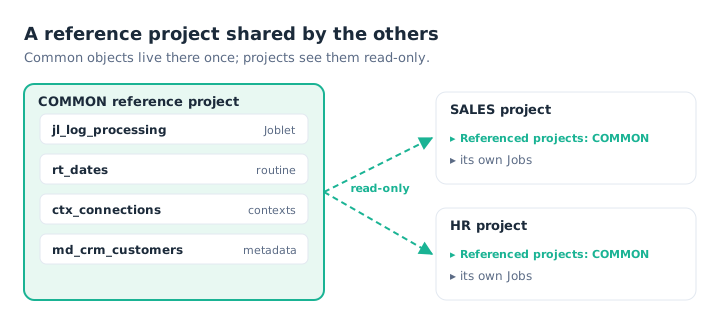
Common code lives in one place; a fix benefits every project.
The author recommends a single reference project, two or three in debatable cases: too many references blur the dependencies. Their use and rules are written down in the development guide.
Git rather than Job versions
Each Job carries, in its properties, a version number (major and minor) and a status. Dale Anderson warns that these versions are meant for a lone developer without source control. Each increment creates a full copy of the Job in the workspace, synchronised with the repository; after a dozen increments, the project grows heavy and takes a long time to open.
The best practice is to leave versioning to the repository: branches for developments and fixes, tags for releases. The repository only stores the differences, and each Job’s history stays readable. The release numbering scheme is written down in the guide too.
Component tests
Studio lets you create a component test (test case): right-click a component, Create Test Case. The test framework is installed, if needed, through Studio’s Feature Manager. Studio generates a test Job that reads an input file, passes it to the component under test, writes the result and compares it with a reference file. The test passes if both files are identical.
Studio generates these tests as JUnit. They are not unit tests in the strict sense, but they are valuable for a complex tMap or a tJavaRow. The test stays tied to the component: if its schema changes in the Job, the test inherits the change. One test accepts several pairs of input and reference files, to try correct, faulty, large or edge-case data.
Building and deploying without a click
These tests come into their own in continuous integration. Talend CI Builder, a Maven plugin, compiles the Jobs from the Git repository, runs their tests and publishes the artefacts. A Maven profile chooses the destination: nexus for a Nexus or Artifactory repository, cloud-publisher for Talend Management Console, docker for an image. An orchestrator such as Jenkins, GitLab CI or Azure DevOps chains these steps on each commit.
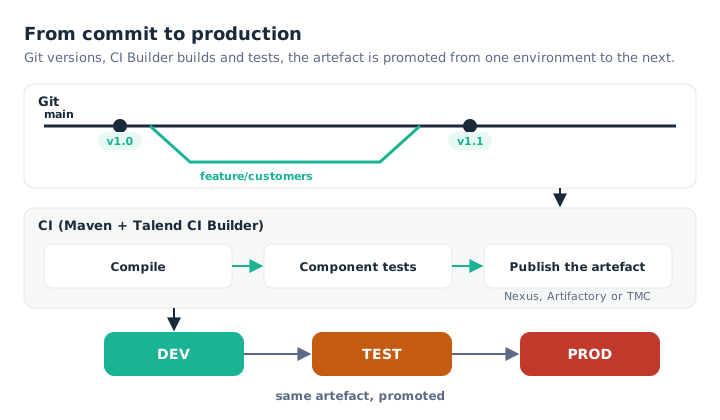
A commit triggers the build and the tests; the same artefact then moves from DEV to PROD.
The principle to remember: you do not rebuild a Job for each environment. You build one artefact, and promote it from DEV to TEST then to PROD, changing only the context.
Custom components and Job Scripts
With more than a thousand components, the palette covers most needs. There remain cases where a specialised function is worth turning into a reusable component. In 2016, Dale Anderson pointed to Talend Exchange, the community marketplace, and to Studio’s Component Designer perspective, which produces JavaJet components.
He ended his series with Job Scripts: the description of a Job as text, from which Studio generates the Job. Combined with metadata describing the Jobs to produce, they make it possible to generate families of similar Jobs. We give a complete example, with the deployment procedure, in the article on structuring a Job.
What has changed since 2016
- Git has replaced SVN: it is the only option on Qlik Talend Cloud. The documentation describes the usual branching workflows (feature branch, Gitflow).
- Project references have been declared in Studio since Talend 7.0, no longer in Talend Administration Center.
- Talend Exchange was removed from Studio in 2023; its content was moved to GitHub. To develop a component, the documentation now points to the Talend Component Kit, a Java framework.
Key takeaways
- Two life cycles. Code (SDLC) and databases (DDLC) are both versioned.
- A workspace outside the installation folder. Easy to find, safe from updates.
- One reference project. Common code in one place, read-only elsewhere.
- Git, not Job versions. Branches to develop, tags to release.
- Component tests. An input file, a reference file, a verdict.
- One promoted artefact. Built once by CI, deployed from DEV to PROD.
Try it in Talend Studio
To create a first component test:
- If the Create Test Case menu does not appear, install the test framework through the Feature Manager. Create a file
names.csvcontainingsmithandjones, one name per line, and a fileexpected.csvcontainingSMITHandJONES. - Create a Job: a
tFileInputDelimited(onenamecolumn) linked to atMap, which outputsnamewith the expressionrow1.name.toUpperCase(), linked to atFileOutputDelimited. - Right-click the
tMap, Create Test Case, keeping the Create a Test Skeleton option. Studio creates and opens the test Job. - In the Job’s Test Cases view, set
names.csvas the input file andexpected.csvas the reference file. - Run the test: it passes. Change the expression to
row1.name.toLowerCase()in the Job, run it again: it fails.
Sources
- Dale Anderson, Talend Job Design Patterns and Best Practices, part 2, part 3 and part 4, Talend (archived version).
- Qlik Talend help: project references, Job versions, Git best practices, creating a test case, tests in continuous integration, CI Builder build options and custom components.
All credit for the original content goes to Dale Anderson; the adaptation to Talend Studio 8 and any errors are HeyData’s. This article is part of our series on Talend Job design best practices: explore the series.