
Draft: this article is not published. It is not listed on the blog and not indexed.
· By HeyData team
Series: Designing Talend Jobs: Dale Anderson’s best practices, revisited for Studio 8 · article 3 of 7
Triggers, errors and logs in Talend: OnSubjobOk, tLogCatcher and Log4j2
A Job that works when all goes well is only half written. In production, a file is missing, a database does not answer, a row is malformed. A Job’s quality is measured by what it does then: does it stop cleanly? Does it leave a usable trace? Can it be restarted without redoing everything? It all starts with a seemingly trivial question: in what order does Studio run the components?
This article summarises and adapts to Talend Studio 8 parts 1 and 3 of “Talend Job Design Patterns and Best Practices” by Dale Anderson (Talend, 2015-2016). His advice remains a reference: we revisit it with today’s tools.
Subjob or component: two families of triggers
On the canvas, two kinds of links connect components. Data links (Row) carry rows from one component to another. Triggers carry nothing: they set the order of execution.
A subjob is a group of components connected by data links. Studio surrounds it with a coloured frame, which can be hidden from the toolbar. Triggers differ by their starting point:
OnSubjobOkandOnSubjobErrorwait for the whole subjob to end. They always leave from the subjob’s first component;OnComponentOkandOnComponentErrorleave from a given component, as soon as it has finished;Run Ifalso leaves from a component, but only fires if a Java expression is true.
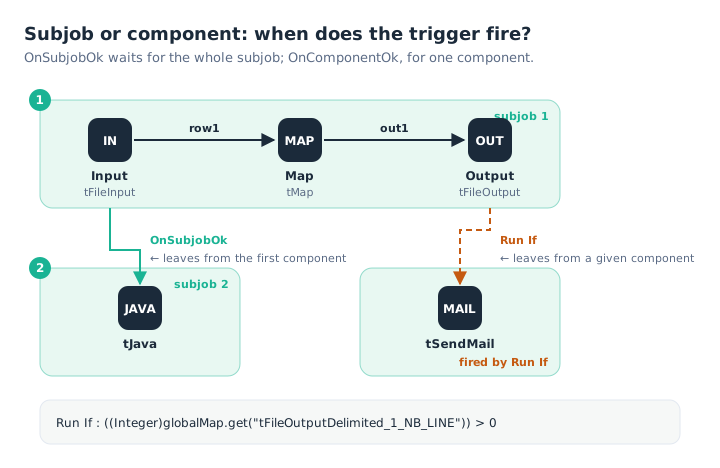
OnSubjobOk leaves from the first component and waits for the whole subjob; Run If leaves from a given component and tests a condition.
A Run If expression often reads one of the component’s system variables, such as the number of rows written:
((Integer)globalMap.get("tFileOutputDelimited_1_NB_LINE")) > 0Here, the e-mail is only sent if the output file received at least one row. We detail these variables in the article on contexts and variables.
Error handling shared by every Job
For Dale Anderson, error handling is where a best practice pays off most, because it can be reused in almost every Job of a project. His pattern rests on two elements.
The first is a logging Joblet, included in every Job. It holds a tLogCatcher, which catches Java exceptions as well as messages from tWarn and tDie. It formats them, then writes them to a table or a file. This Joblet has no input or output: it watches in the background.
The second is a set of return codes defined once and for all. tDie and tWarn accept a code; the parent Job reads it after each tRunJob in the CHILD_RETURN_CODE variable, and decides what comes next: carry on, restart, alert.
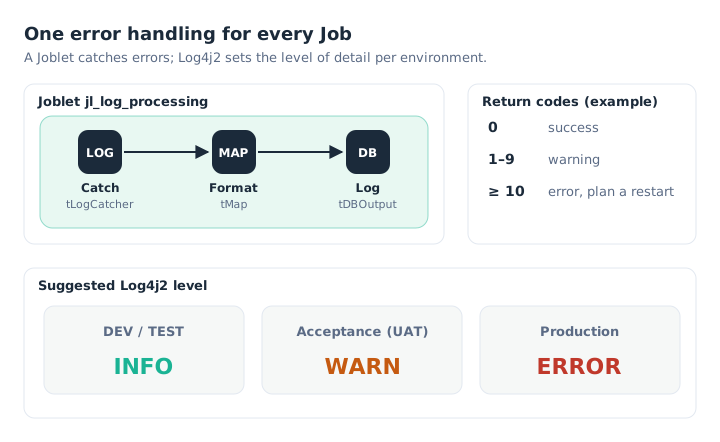
The Joblet catches, formats and logs; return codes tell the parent what to do.
The code grid in our diagram is only an example. What matters is to have one, written down in the development guide, and that every Job follows it.
Log4j2: one log level per environment
Studio includes the Apache Log4j logging framework, and every component uses it. Dale Anderson advised enabling it and adapting the level of detail to the environment:
INFOin development and test, to follow the run;WARNin acceptance;ERRORin production, to keep only the essentials.
Messages of a more severe level are always included: a Job set to WARN also logs errors. In Talend Studio 8, Log4j is configured in the Project Settings, Log4j section. The XML configuration there is shared by all Jobs, which guarantees messages in the same format.
Execution statistics and logs
Beyond messages, Studio can collect execution data through three components:
tStatCatcherrecords the start, end, duration and status of each Job and component;tLogCatchercollects exceptions and messages fromtWarnandtDie;tFlowMeterCatcherrecords the volumes measured bytFlowMetercomponents.
Rather than placing them in each Job, you can enable them for the whole project in Project Settings › Job Settings › Stats & Logs. The data is written to the console, to files or to a database. Stored in a database, it lends itself to SQL queries, for example to alert when a return code exceeds a threshold.
Recovery checkpoints
For a long Job with several critical steps, restarting everything after an error is costly. Studio lets you set recovery checkpoints on OnSubjobOk and OnSubjobError triggers. On failure, the administrator restarts the Job from the last checkpoint passed, from the Error Recovery Management page of Talend Administration Center.
This feature is tied to Talend Administration Center and can only be set in a remote project. We did not find it in Talend Management Console. On Qlik Talend Cloud, we rather advise splitting the process into child Jobs that can be restarted separately.
What has changed since 2016
- Log4j has moved to version 2. It is enabled by default in a new project; a project imported from version 7.2 or earlier stays on the deprecated Log4j 1 until you change the version in the project settings.
- The Activity Monitoring Console is no longer a Talend Administration Center web application since Talend 8.0. It remains as an optional Studio add-on, and the Stats & Logs data can still be used.
- Talend LogServer, the central log server, has been deprecated since Talend 8.0. Its removal from Talend Administration Center was announced for June 2026; an ELK stack is set up separately.
Key takeaways
- Two families of triggers. OnSubjob waits for the whole subjob, OnComponent for one component.
- OnSubjob leaves from the first component. That component stands for the subjob.
- Run If tests a Java condition. Often a system variable such as
NB_LINE. - A logging Joblet everywhere.
tLogCatchercatches, atDBOutputlogs. - Shared return codes. The parent reads them in
CHILD_RETURN_CODEand decides what comes next. - One Log4j2 level per environment. INFO in test, WARN in acceptance, ERROR in production.
Try it in Talend Studio
To observe the execution order of triggers:
- Create a Job with a
tRowGenerator(five rows) linked to atLogRow: this is subjob 1. - Add a
tJavathat printsSystem.out.println("Subjob 2");, linked from thetRowGeneratorby OnSubjobOk. - Add a second
tJavathat printsSystem.out.println("After the tLogRow");, linked from thetLogRowby OnComponentOk. - Run it: the second
tJava’s message appears as soon as thetLogRowends, the first one’s at the end of the subjob. - Replace the second link with a Run If using the expression
((Integer)globalMap.get("tLogRow_1_NB_LINE")) > 3: the message only appears if more than three rows were displayed.
Sources
- Dale Anderson, Talend Job Design Patterns and Best Practices, part 1 and part 3, Talend (archived version).
- Qlik Talend help: configuring Log4j, Stats & Logs, checkpoints on trigger connections and Talend 8.0 deprecated and removed items.
All credit for the original content goes to Dale Anderson; the adaptation to Talend Studio 8 and any errors are HeyData’s. This article is part of our series on Talend Job design best practices: explore the series.