
· By HeyData team
Series: Lesser-known Qlik Sense functions and keywords: a series · article 3 of 13
Dollar-sign expansion in Qlik Sense: $(var), $(=…), $(#…) and parameters
$(vMargin), $(=Max(Year)), $(#vRate): dollar notation is everywhere in Qlik apps, often copied from one project to the next without being really understood. Yet the principle fits in one sentence: dollar-sign expansion replaces text with text, before the engine evaluates anything. Almost all of its pitfalls follow from that.
This article is part of our series on lesser-known Qlik Sense functions and keywords. It is based on the Qlik help; links are at the end of the article.
A text replacement
$(…) works like a macro. Just before evaluating a script statement or a chart expression, the engine replaces each $(…) with the text it produces. It then evaluates the result, as if you had typed it.
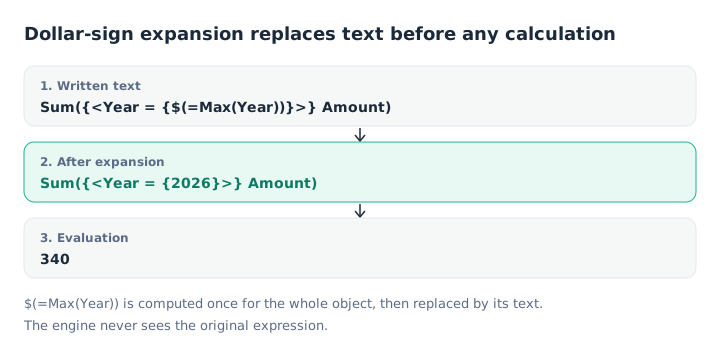
The engine only evaluates the text obtained after replacement.
Three forms coexist:
$(vName): the variable’s text;$(=expression): the result of the expression, computed then turned into text;$(#vName): the variable’s numeric value, written with a decimal point.
Variables: SET keeps the text, LET computes
In the script, SET stores the text as is, LET evaluates it first:
SET vMargin = Sum(Amount) - Sum(Cost);   // the expression's text
LET vToday  = Today();                   // today's date, computed at load time
For a reusable measure, SET is the right choice: =$(vMargin) in a chart becomes =Sum(Amount) - Sum(Cost), evaluated in the chart’s context. With LET, the script would try to compute Sum(Amount) outside of any LOAD.
$(=…): one calculation for the whole object
$(=Max(Year)) is computed once for the whole object, in that object’s selection state, before the rows are calculated. In a table by year, every row therefore gets the same text, 2026. That is what makes the expression useful in set analysis, and also what prevents using it for “the row’s year minus one”: our article on advanced set analysis details this pitfall.
The Qlik help points out another consequence: a plain expansion ignores alternate states, but an expansion with = is evaluated in the object’s state.
Parameters: $1 to $9
A variable can contain formal parameters, $1, $2 and so on, filled in at call time:
SET vMul = $1 * $2;
LET vResult = $(vMul(3, 7));   // 21
SET vText   = $(vMul(3, 7));   // the text 3 * 7
$0 gives the number of parameters received. Extra parameters are ignored without an error; a missing parameter leaves $2 as is in the text.
The comma pitfall. Parameters are split on commas, before any parsing. A set expression passed as a parameter, such as {<Year = {2025, 2026}>}, is therefore cut in two. Write the list without a comma when possible ({<Year = {">=2025<=2026"}>}), or put the part containing commas in another variable, called from the body of the first one.
$(#…): the decimal separator
When the app uses a comma as the decimal separator, $(vX) produces 3,5. Placed in a function call, that text becomes two arguments.
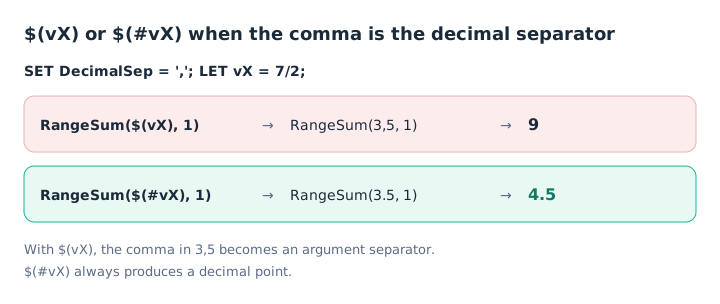
With $(vX), 3,5 becomes two numbers: 3 and 5.
$(#vX) always writes the number with a decimal point, possibly in exponential notation for very large or very small numbers. If the variable holds no number, it returns 0. This is the form to use in a calculation, a function call or an INLINE.
Including a script file
The same notation includes a script file, handy for sharing functions or connections across apps:
$(Must_Include=lib://Scripts/common.qvs);Must_Include stops the load if the file cannot be found, whereas Include silently skips it. Prefer the first form: a visible error is better than an incomplete script. Note that the help says there must be no space around the = sign.
Key takeaways
- Text before calculation. The expansion replaces text, then the engine evaluates the result.
- SET for expressions. LET computes at load time; SET keeps the text for the chart.
- $(=…) once per object. The result is the same on every row.
- Watch the commas. They separate parameters, and cut a set expression passed as an argument.
- $(#…) for numbers. A guaranteed decimal point, whatever the regional settings.
- Must_Include rather than Include. A missing file should stop the load.
Try it in Qlik Sense
This script replays the article’s examples. Paste it into the data load editor of an empty app, pick an example with the vExample variable, then reload. Results show in the load log (TRACE) or in the tables described.
// Dollar-sign expansion in Qlik Sense: try-it script (HeyData)
// Paste it into the data load editor of an empty app, pick an example,
// reload, then read the load log.
SET vExample = 1;   // 1 to 3

IF $(vExample) = 1 THEN
    // Example 1: SET, LET and parameters
    SET vMul = $1 * $2;
    LET vResult = $(vMul(3, 7));
    SET vText = $(vMul(3, 7));
    SET vParamCount = $0;
    LET vCount = $(vParamCount(1, 2, 3));
    TRACE vResult = $(vResult) | vText = $(vText) | number of parameters = $(vCount);
    // Log: vResult = 21 | vText = 3 * 7 | number of parameters = 3
END IF

IF $(vExample) = 2 THEN
    // Example 2: variables for charts (first diagram)
    Sales:
    LOAD * INLINE [
    Year, Amount, Cost
    2025, 210, 150
    2026, 340, 200
    ];
    SET vMargin = Sum(Amount) - Sum(Cost);
    // KPI: =$(vMargin)                                   → 200
    // KPI: =Sum({<Year = {$(=Max(Year))}>} Amount)       → 340
    // Table by Year, measure =Sum({<Year = {$(=Max(Year))}>} Amount): 340 on 2026 only
END IF

IF $(vExample) = 3 THEN
    // Example 3: $(vX) and $(#vX) with a decimal comma (second diagram)
    SET DecimalSep = ',';
    LET vX = 7/2;
    Test:
    LOAD RangeSum($(vX), 1)  as WithComma,
         RangeSum($(#vX), 1) as WithHash
    AUTOGENERATE 1;
    SET DecimalSep = '.';
    // WithComma = 9 (3 + 5 + 1), WithHash = 4.5, displayed 4,5: the decimal comma was active at load time
END IF
Sources
- Qlik Cloud help: Dollar-sign expansions, principle and limits.
- Qlik Cloud help: expansion using a variable, using parameters and using an expression.
- Qlik Cloud help: Include, the difference between
IncludeandMust_Include.
Text and examples are by HeyData. This article is part of our series on lesser-known Qlik Sense functions and keywords: explore the series.