
· By HeyData team
Outer set expressions in Qlik Sense: one set for the whole expression
An average basket for 2025 is traditionally written like this:
Sum({<Year={2025}>} Amount) / Count({<Year={2025}>} DISTINCT Customer)The same set, twice. Add a condition on the region, and it has to be carried everywhere, without missing one. Since August 2022, Qlik Sense accepts a set placed in front of the expression, which applies to all its aggregations: the outer set expression. It also applies to master measures and variables, and the 2025 releases clarified how several sets chain together. Every result in this article was checked in Qlik Cloud.
Inner or outer: where to place the set
The classic set, inside an aggregation’s brackets, is an inner set expression. Placed in front, it becomes an outer set expression:
{<Year={2025}>} Sum(Amount) / Count(DISTINCT Customer) // → 67.5The result is the same as the long version: 270 of sales for 4 customers in 2025. Two syntax rules:
- the outer set goes at the start of its scope, never in the middle;
- its scope is the whole expression, unless brackets limit it.
({<Year={2025}>} Sum(Amount)) / Sum(Amount) // → 0.397: 2025's share of the totalHere, only the numerator inherits the set; the denominator keeps the current selection, that is 680.
Who wins when inner and outer meet?
The two sets combine, and the inner one has the last word.
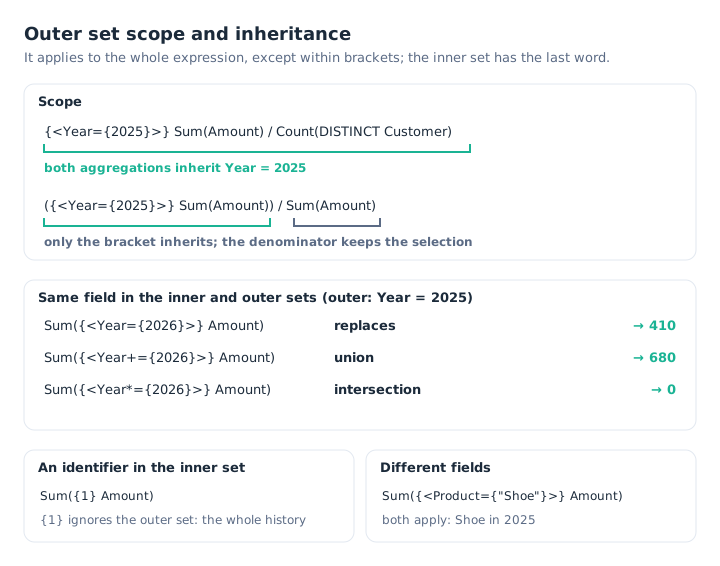
The outer set sets the context; the inner set completes, modifies or replaces it.
- An identifier in the inner set (
{1},{$}, a bookmark) replaces the outer context.{<Year={2025}>} Sum(Amount) / Sum({1} Amount)gives 2025’s share of the whole history. - For the same field in both sets:
=replaces the outer value,+=takes the union,*=the intersection. - With different fields, the sets add up:
{<Year={2025}>} Sum({<Product={"Shoe"}>} Amount)gives the Shoe sales in 2025, that is 140.
{<Year={2025}>} Sum({<Year={2026}>} Amount)              // → 410: the inner set replaces
{<Year={2025}>} Sum({<Year+={2026}>} Amount)             // → 680: union
{<Year={2025,2026}>} Sum({<Year*={2026}>} Amount)        // → 410: intersection
An aggregation keeps only one inner set. If you write several, only the rightmost counts, with no error message. Finally, in an Aggr(), the inner aggregation inherits from the Aggr(), and the Aggr() inherits from the outer set: {<Year={2025}>} Sum(Aggr(Sum(Amount), Customer)) does give 270.
Several outer sets in a row
You can chain as many outer sets as you like. They apply from left to right, each inheriting from the previous one, and, when they conflict on the same field, the rightmost wins:
{<Year={2025}>} {<Region={"North"}>} Sum(Amount)   // → 150: North in 2025
{<Year={2025}>} {<Year={2026}>} Sum(Amount)        // → 410: 2026 wins
The benefit shows with variables: a “period” set and a “scope” set, defined separately, combine by placing one after the other.
The empty set trap, and the & flag
A set can be empty: a value that does not exist (Year={2024} in our data), an incompatible user selection, or an explicit {<Year={}>}. On its own, it logically gives 0. But when another set follows it, Qlik clears the empty selection on that field before applying the rest. The result is surprising:
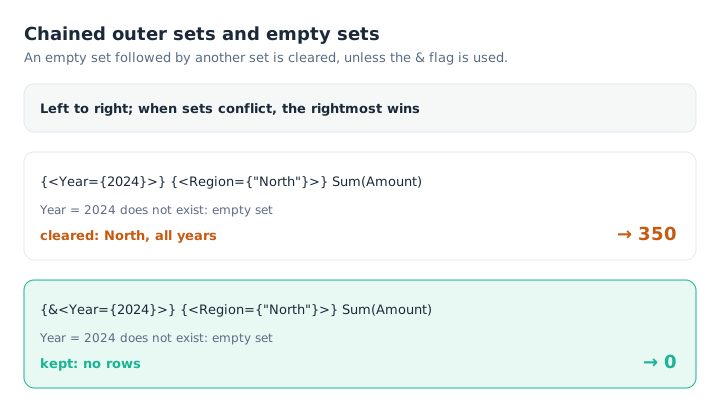
Without the flag, a non-existent year amounts to “all years”.
{<Year={2024}>} Sum(Amount)                         // → 0
{<Year={2024}>} {<Region={"North"}>} Sum(Amount)    // → 350: empty Year cleared
{&<Year={2024}>} {<Region={"North"}>} Sum(Amount)   // → 0: empty set kept
Clearing only affects the empty field: the region is applied as expected. It also happens when the empty set is followed by an inner set: {<Year={2024}>} Sum({<Region={"North"}>} Amount) also gives 350.
The & flag, placed right after the opening brace, keeps the empty set. It applies to an expression with at least two outer sets, or one outer and one inner set. As soon as one of a set’s values comes from a variable or a selection, it is safer to add it: a 0 gets noticed, a wrong total much less so.
Outer sets and dollar-sign expansion
A variable combines naturally with an outer set… provided you know what the expansion inserts. Dollar-sign expansion happens before the calculation: Qlik replaces $(…) with its result, then evaluates the resulting expression.
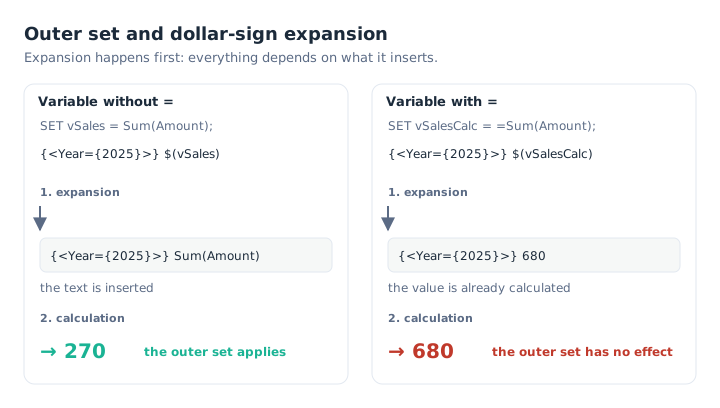
A variable holding a formula inherits the set; a variable holding a result does not.
SET vSales = Sum(Amount);       // the formula
SET vSalesCalc = =Sum(Amount);  // the result, calculated on its own

{<Year={2025}>} $(vSales)        // → 270
{<Year={2025}>} $(vSalesCalc)    // → 680: the outer set only sees a number
{<Year={2025}>} $(=Sum(Amount))  // → 680, for the same reason
The rule fits in one sentence: the outer set only applies to the aggregations that appear in the text after expansion. A variable whose definition starts with = is calculated on its own, on the current selection, and only inserts a number. The Qlik help mentions a variant: an expansion that produces text, such as $(='Sum(' & 'Amount' & ')'), inserts Sum(Amount), and the outer set applies.
An outer set in front of a master measure
Since February 2021, an expression can call a master measure by its name, in square brackets. Since August 2022, an outer set can precede it:
[Sales]                    // → 680: the master measure Sales = Sum(Amount)
{<Year={2025}>} [Sales]    // → 270
{<Year={2026}>} [Sales]    // → 410
This is the most useful combination in practice. The calculation rule is defined only once, in the library, and each chart adapts it by period or scope, without creating “Sales 2025”, “Sales 2026” or “Sales last year” measures.
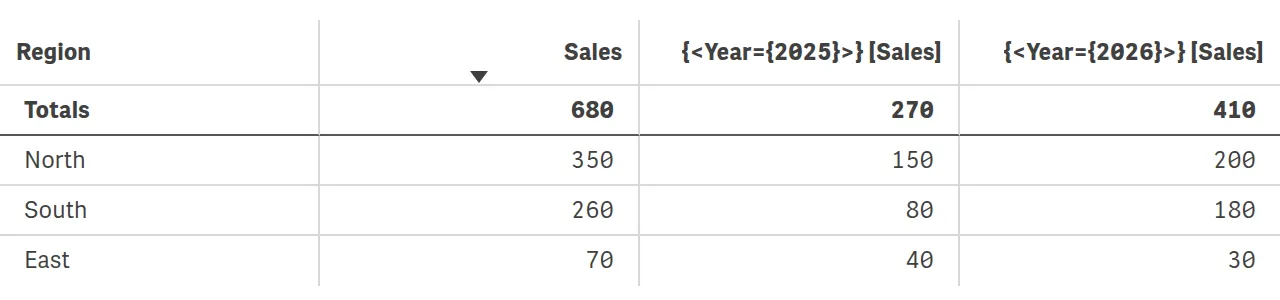
A single master measure, broken down by year with an outer set (Qlik Cloud screenshot).
Two limits, documented by Qlik. If the master measure is renamed or deleted, the expressions that call it are not updated and return NULL. And the measure’s number format, colour and label do not follow: they are set in the chart. Finally, avoid giving a measure the name of a field or a variable.
What changes in your apps
- Shorter expressions. A ratio, a margin or a rate is written with a single set.
- A smaller library. One master measure per business rule, adapted with an outer set.
- Composable sets. A period variable and a scope variable, chained.
- Two reflexes. Check the scope of brackets, and prefer variables without
=in front of an outer set.
Outer sets and their use with master measures have been available in all editions since August 2022. Chained sets, implicit clearing and the & flag are documented in the client-managed help from May 2025; in Qlik Cloud, they already worked at the end of 2024, according to a Qlik support answer relayed on Qlik Community.
Key takeaways
- One set for the whole expression.
{<…>}in front of the expression applies to all its aggregations. - Brackets limit the scope. And the outer set always goes first.
- The inner set has the last word. An identifier replaces the context;
=,+=,*=replace, unite or intersect. - Left to right. In a chain of outer sets, the rightmost wins.
- The & flag against empty sets. Without it, an empty set followed by another is cleared.
- Variables without =. Only the inserted text inherits the outer set.
Try it in Qlik Sense
Paste this script into the data load editor of an empty app and reload. Then create a master measure named Sales, with the expression Sum(Amount). The expressions to try, in KPIs or a table, are in comments.
// Outer set expressions: test script (HeyData)
Sales:
LOAD * INLINE [
Region, Year, Product, Customer, Amount
North, 2025, Shoe, A, 100
North, 2025, Hat, B, 50
North, 2026, Shoe, A, 200
South, 2025, Bag, C, 80
South, 2026, Hat, C, 120
South, 2026, Shoe, D, 60
East, 2025, Shoe, E, 40
East, 2026, Bag, E, 30
];

SET vSales = Sum(Amount);
SET vSalesCalc = =Sum(Amount);

// With no selection:
//   Sum({<Year={2025}>} Amount) / Count({<Year={2025}>} DISTINCT Customer)  → 67.5
//   {<Year={2025}>} Sum(Amount) / Count(DISTINCT Customer)                  → 67.5
//   ({<Year={2025}>} Sum(Amount)) / Sum(Amount)                             → 0.397
//   {<Year={2025}>} Sum(Amount) / Sum({1} Amount)                           → 0.397
//   {<Year={2025}>} Sum({<Year={2026}>} Amount)                             → 410
//   {<Year={2025}>} Sum({<Year+={2026}>} Amount)                            → 680
//   {<Year={2025,2026}>} Sum({<Year*={2026}>} Amount)                       → 410
//   {<Region={"North","South"}>} Sum({<Region*={"South","East"}>} Amount)   → 260
//   {<Year={2025}>} Sum({<Product={"Shoe"}>} Amount)                        → 140
//   {<Year={2025}>} {<Region={"North"}>} Sum(Amount)                        → 150
//   {<Year={2025}>} {<Year={2026}>} Sum(Amount)                             → 410
//   {<Year={2024}>} Sum(Amount)                                             → 0
//   {<Year={2024}>} {<Region={"North"}>} Sum(Amount)                        → 350
//   {&<Year={2024}>} {<Region={"North"}>} Sum(Amount)                       → 0
//   {<Year={2025}>} $(vSales)                                               → 270
//   {<Year={2025}>} $(vSalesCalc)                                           → 680
//   {<Year={2025}>} [Sales]                                                 → 270
//   {<Year={2025}>} Sum(Aggr(Sum(Amount), Customer))                        → 270
Sources
- Qlik Cloud help: Inner and outer set expressions, Outer set expressions and dollar-sign expansions, Empty set preserve flag and Using master measures in expressions.
- Qlik, News since Qlik Sense 1.0: February 2021 and August 2022 sections.
- Henric Cronström, New Set Analysis syntax, Qlik Community, 2022.
- Qlik Community, discussion on inheriting an empty outer set, 2024.
To review the basics and the P() and E() functions, read our article on advanced set analysis, and for variables, the one on dollar-sign expansion.