
· By HeyData team
Series: Lesser-known Qlik Sense functions and keywords: a series · article 10 of 13
Dual() and the dual nature of values in Qlik Sense
Why does a month field sort from January to December rather than from April to September? Why do account codes 001 and 1 sometimes merge into one? Both answers come from a feature of the Qlik engine: a field value can have two natures at once, a text and a number. The Dual() function lets you build such values yourself.
This article is part of our series on lesser-known Qlik Sense functions and keywords. It is based on the Qlik help; links are at the end of the article.
A text and a number
A date is the most common example: 2026-03-15 displays as text but is worth a number (the day’s serial number), which lets you sort it, compare it and subtract another date from it. Interpretation functions such as Date#() or Num#() produce such values. Dual(text, number) builds one from two expressions.
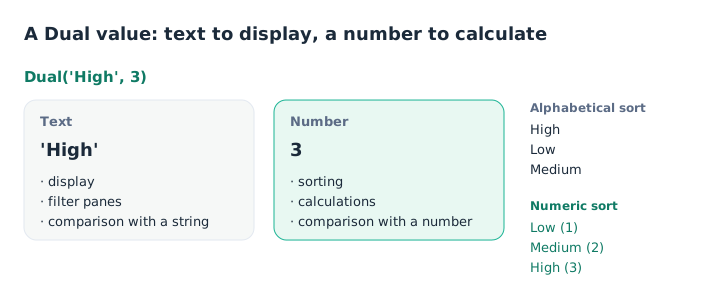
The text is displayed, the number sorts and calculates.
The engine picks the nature that fits the context: the text for display, the number for numeric sorting and calculations. Priority = 'High' compares the text, Priority >= 2 compares the number.
Sorting without a sort table
The classic use case: labels that must follow a business order.
Tickets:
LOAD TicketID,
     Dual(Pick(PriorityCode, 'Low', 'Medium', 'High'), PriorityCode) as Priority
INLINE [
TicketID, PriorityCode
T1, 3
T2, 1
T3, 2
];
In a chart, Priority sorted numerically gives Low, Medium, High. The Qlik help gives two other useful examples:
Dual('Q' & Ceil(Month(Date) / 3), Ceil(Month(Date) / 3))     as Quarter,
Dual(WeekYear(Date) & '-W' & Week(Date), WeekStart(Date))     as YearWeek
The quarter displays Q1 to Q4 and sorts from 1 to 4. The week displays 2026-W12 and sorts by the date of its first day, which handles the turn of the year.
A flag you can sum
Dual() also works for flags: Dual('Yes', 1) and Dual('No', 0) read clearly in a filter pane, and Sum(HasOrder) directly counts the customers who ordered. Our article on NULL and missing values gives an example with Exists().
The pitfall: the first representation wins
A field keeps only one text per numeric value. If two values have the same number but different texts, they all share the first text encountered during the load. The Qlik help states it for Dual(), but the rule applies to any value interpreted as a number.
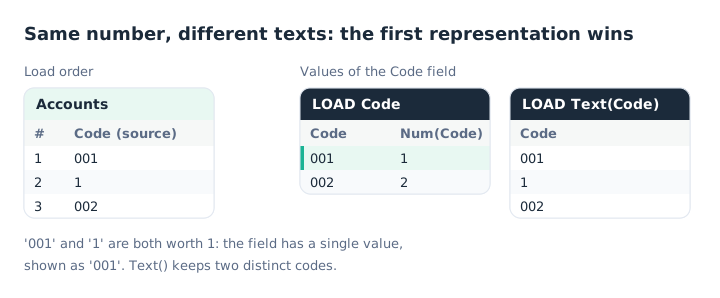
‘001’ comes first: ‘1’ will also display as ‘001’.
The most common real case involves codes: accounts, items, postcodes. 001 and 1 are interpreted as the number 1 and merge into a single value. For an identifier, the rule is simple: force text at load time.
Accounts:
LOAD Text(Code) as Code, Label
FROM [lib://Data/Accounts.csv] (txt, utf8, embedded labels, delimiter is ';');
Conversely, the rule can be put to use: loading a small label table before the facts sets how values display. This is what the help recommends to control the text of a Dual().
Key takeaways
- Two natures per value. A text for display and string comparison, a number for sorting and calculations.
- Dual() sorts labels. Priorities, quarters, weeks: the business order without a sort table.
- A Dual flag can be summed.
Dual('Yes', 1)reads clearly and counts withSum(). - The first text wins. Two values with the same number share the text loaded first.
- Text() for codes. An identifier with leading zeros must be loaded as text.
Try it in Qlik Sense
This script replays the article’s examples with the data from the diagrams, loaded INLINE: it needs no file and no database. Paste it into the data load editor of an empty app, pick an example with the vExample variable, then reload.
// Dual() in Qlik Sense: try-it script (HeyData)
// Paste it into the data load editor of an empty app, pick an example,
// reload, then show the fields in a filter pane or a table.
SET vExample = 1;   // 1 to 3

IF $(vExample) = 1 THEN
    // Example 1: priorities sorted in business order (first diagram)
    Tickets:
    LOAD TicketID,
         Dual(Pick(PriorityCode, 'Low', 'Medium', 'High'), PriorityCode) as Priority,
         Date(Date#(OpenDate, 'YYYY-MM-DD')) as OpenDate,
         Dual('Q' & Ceil(Month(Date#(OpenDate, 'YYYY-MM-DD')) / 3),
              Ceil(Month(Date#(OpenDate, 'YYYY-MM-DD')) / 3)) as Quarter
    INLINE [
    TicketID, PriorityCode, OpenDate
    T1, 3, 2026-02-10
    T2, 1, 2026-05-04
    T3, 2, 2026-11-20
    ];
    // Filter pane Priority, numeric sort: Low, Medium, High.
END IF

IF $(vExample) = 2 THEN
    // Example 2: the first representation wins (second diagram)
    AccountsNumeric:
    LOAD Code as CodeNumeric INLINE [
    Code
    001
    1
    002
    ];

    AccountsText:
    LOAD Text(Code) as CodeText INLINE [
    Code
    001
    1
    002
    ];
    // CodeNumeric: 2 values, 001 and 002. CodeText: 3 values, 001, 1 and 002.
END IF

IF $(vExample) = 3 THEN
    // Example 3: a Dual flag you can sum
    Customers:
    LOAD CustomerID,
         If(Orders > 0, Dual('Yes', 1), Dual('No', 0)) as HasOrder
    INLINE [
    CustomerID, Orders
    C1, 3
    C2, 0
    C3, 1
    ];
    // Filter pane HasOrder: Yes, No. Measure Sum(HasOrder): 2.
END IF
Sources
- Qlik Cloud help: Dual - script and chart function, examples and the first-representation rule.
- Qlik Cloud help: Text - script and chart function.
Text and examples are by HeyData. This article is part of our series on lesser-known Qlik Sense functions and keywords: explore the series.