
· By HeyData team
Series: Lesser-known Qlik Sense functions and keywords: a series · article 11 of 13
FirstSortedValue, Concat, Only, Rank: lesser-known Qlik Sense aggregations
Sum(), Count() and Avg() return numbers. But the question asked is often of another kind: which product is the cheapest, which categories are selected, what is this row’s single value, what rank does this customer hold. Four aggregations answer it directly, without nested If() or Aggr(): FirstSortedValue(), Concat(), Only() and Rank(). Each has a rule that surprises the first time.
This article is part of our series on lesser-known Qlik Sense functions and keywords. It is based on the Qlik help; links are at the end of the article.
FirstSortedValue(): the value that goes with the minimum
Min(Price) gives the lowest price. FirstSortedValue(Product, Price) gives the product with that price: the function sorts the rows by the second argument and returns the first argument of the top row.
FirstSortedValue([DISTINCT] [TOTAL [<fields>]] value, sort_weight [, rank])- A minus sign in front of the weight reverses the sort:
FirstSortedValue(Product, -Price)returns the most expensive product. - The
rankgives the nth value:FirstSortedValue(Product, Price, 2)returns the second cheapest. - The weight can be an expression:
-Price * Quantitysorts by amount.
The pitfall: if several rows share the same weight, the function returns NULL. It does not pick at random; it refuses to pick.
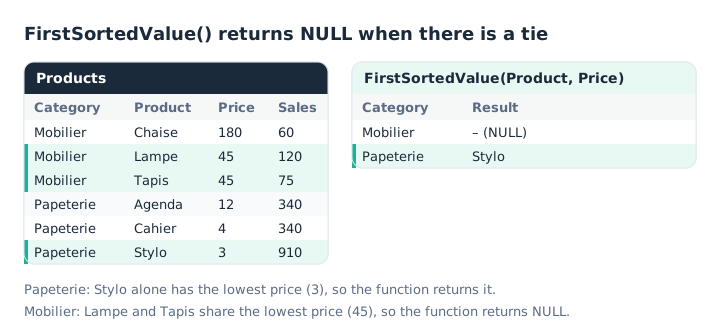
A dash where Lampe or Tapis was expected: it is a tie, not missing data.
Two ways out:
// Break the tie with a second criterion: price, then the highest sales
FirstSortedValue(Product, Price * 10000 - Sales)                 // Mobilier: Lampe

// Show all tied values
Concat(Aggr(If(Min(Price) = Min(TOTAL <Category> Price), Product), Category, Product), ', ')
// Mobilier: Lampe, Tapis
The first assumes Sales stays below 10,000: the multiplier must exceed the possible range of the second criterion. The second goes through Aggr(): for each product, it compares its price with its category’s minimum, then Concat() joins the products kept. Our article on Aggr() pitfalls details this virtual table. The shorter version, Concat(If(Price = Min(TOTAL <Category> Price), Product)), does not work: tested in Qlik Cloud, it returns NULL.
Concat(): all values in one string
Concat() joins the values of a field into a single string. In a table by category, on the Papeterie row:
Concat(DISTINCT Product, ', ')            // Agenda, Cahier, Stylo
Concat(DISTINCT Product, ', ', Price) // Stylo, Cahier, Agenda: by ascending price- Without
DISTINCT, a value present on several rows appears several times. - The third argument sets the order: the value with the lowest weight comes first. Without it, the sort is alphabetical; with
0, no sorting is applied.
Uses abound: a reminder of the selections in a title, a tooltip listing the products of a bar, or a list built in the script and then injected into a variable.
Only(): one value, or nothing
Only(Category) returns the category if there is only one in the context, and NULL otherwise. It is a safeguard: where MaxString() would pick a value without warning, Only() flags the ambiguity.
If(IsNull(Only(Category)), 'Several categories', Only(Category))The Qlik help suggests another use: hosting a set expression without aggregating anything. A row-by-row detail table, limited to the latest month, is written with an Only({<Month = {…}>} Sales) measure: Only() computes nothing, but carries the set.
Rank(): the rank within the column
Rank(Sum(Sales)) gives the row’s rank: 1 for the highest value. Like inter-record functions, Rank() works within the column segment, and TOTAL extends the ranking to the whole column: our article on inter-record functions details this notion.
The surprise comes from ties.
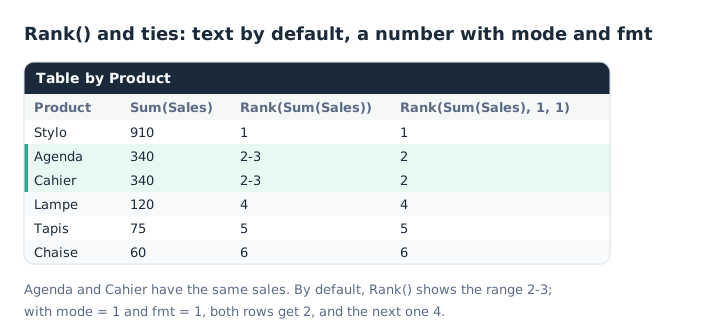
The rank is a dual value: text for display, a number for calculation.
The result is a dual value. By default, tied rows display the range of shared ranks, such as 2-3. Two optional arguments control this behavior:
modesets the number: 1 gives the lowest rank to all rows, 3 the highest, 4 numbers the rows one by one;fmtsets the text: 1 shows the low rank on all rows.
Rank(Sum(Sales), 1, 1) therefore gives the “sports” ranking: 1, 2, 2, 4.
Key takeaways
- FirstSortedValue() returns the value tied to the minimum. A minus sign for the maximum, a rank for the nth.
- A tie gives NULL. Break it with a second criterion, or list the tied values with Concat().
- Concat() joins values. With DISTINCT, a delimiter and, if needed, a sort weight.
- Only() refuses ambiguity. One value if there is only one, NULL otherwise.
- Rank() works within the column segment. TOTAL to rank the whole column.
- Rank() ties can be controlled.
Rank(expr, 1, 1)for the 1, 2, 2, 4 ranking.
Try it in Qlik Sense
This script loads the diagrams’ data INLINE. Paste it into the data load editor of an empty app and reload. The log shows the list of categories built by Concat(); then build the tables described in the comments.
// Lesser-known aggregations in Qlik Sense: try-it script (HeyData)
// Paste it into the data load editor of an empty app, reload,
// then read the log and build the tables described in the comments.
Products:
LOAD * INLINE [
Category, Product, Price, Sales
Mobilier, Chaise, 180, 60
Mobilier, Lampe, 45, 120
Mobilier, Tapis, 45, 75
Papeterie, Agenda, 12, 340
Papeterie, Cahier, 4, 340
Papeterie, Stylo, 3, 910
];

// Concat() in the script: a list in a variable
CategoryList:
LOAD Concat(DISTINCT Category, ', ') as Categories
RESIDENT Products;
LET vCategories = Peek('Categories', 0, 'CategoryList');
DROP TABLE CategoryList;
TRACE Categories: $(vCategories);
// Log: Categories: Mobilier, Papeterie

// Table by Category (first diagram):
//   FirstSortedValue(Product, Price)                                 → Mobilier: NULL, Papeterie: Stylo
//   FirstSortedValue(Product, -Price)                                → Mobilier: Chaise, Papeterie: Agenda
//   FirstSortedValue(Product, Price, 2)                              → Papeterie: Cahier
//   FirstSortedValue(Product, Price * 10000 - Sales)                 → Mobilier: Lampe
//   Concat(Aggr(If(Min(Price) = Min(TOTAL <Category> Price), Product), Category, Product), ', ')
//                                                                    → Mobilier: Lampe, Tapis; Papeterie: Stylo
//   Concat(DISTINCT Product, ', ', Price)                            → Papeterie: Stylo, Cahier, Agenda
//
// Table by Product (second diagram):
//   Only(Category)                                                   → the product's category
//   Rank(Sum(Sales))                                                 → Agenda and Cahier: 2-3
//   Rank(Sum(Sales), 1, 1)                                           → Agenda and Cahier: 2, Lampe: 4
//
// KPI, without a selection then with Category = Mobilier:
//   If(IsNull(Only(Category)), 'Several categories', Only(Category))
Sources
- Qlik Cloud help: FirstSortedValue, sort weight, rank and NULL on a tie.
- Qlik Cloud help: Concat, delimiter and sort weight.
- Qlik Cloud help: Only, single value and use with set analysis.
- Qlik Cloud help: Rank, column segments and the
modeandfmtarguments.
Text and examples are by HeyData. This article is part of our series on lesser-known Qlik Sense functions and keywords: explore the series.