
· By HeyData team
Series: Lesser-known Qlik Sense functions and keywords: a series · article 9 of 13
Merge, Add, Replace: partial reload in Qlik Sense
A full reload deletes every table and replays the whole script. To add today’s orders, or apply a few changes from a log, that is a lot of work for a few rows. A partial reload keeps the tables in memory and only runs certain statements, marked by three prefixes: Add, Replace and Merge.
This article is part of our series on lesser-known Qlik Sense functions and keywords. It is based on the Qlik help; links are at the end of the article.
What runs, and when
In a partial reload, Qlik Sense keeps every existing table and only runs the LOAD and SELECT statements preceded by Add, Replace or Merge. The others are skipped. The Only qualifier does the opposite: an Add Only, Replace Only or Merge Only statement runs only during a partial reload.
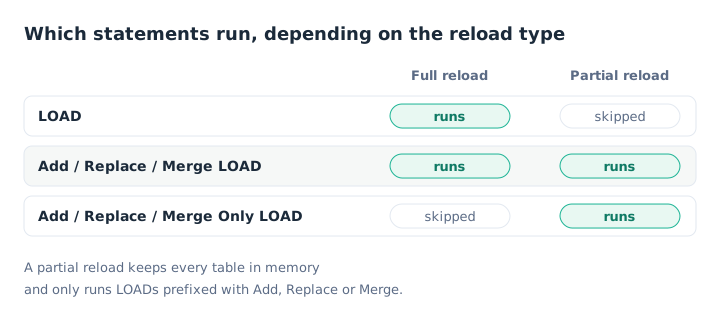
Only reserves a statement for partial reloads.
Control statements (SET, LET, IF, FOR…) run in both cases. A partial reload requires the app to already contain data.
Add: adding rows
Add LOAD appends rows to an existing table: the one with the same fields, or the one named with Concatenate. In a full reload, it behaves like an ordinary LOAD. In a partial reload, it never creates a table: the target table must exist.
Add does not check for duplicates. A second partial reload appends the same rows again, unless you filter them out:
Add LOAD ID, Name, Score
FROM [lib://Data/NewPersons.csv] (txt, utf8, embedded labels, delimiter is ',')
WHERE NOT Exists(ID);
Replace: replacing a table
Replace LOAD drops the existing table, then reloads it. In a partial reload, the drop always happens. In a full reload, it only happens if a table with the same fields already exists, or if Concatenate names one. It is the tool for refreshing a small reference table, such as exchange rates, without touching the facts.
Merge: applying a change log
Merge is the richest of the three. It applies a list of operations to an existing table: the first field of the LOAD holds the operation, Insert, Update or Delete (or i, u, d).
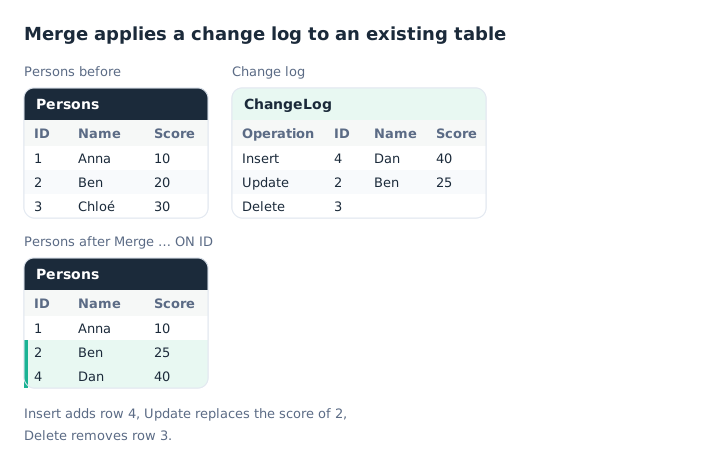
Insert adds, Update replaces, Delete removes.
Merge (ChangeDate, vLastChange) ON ID
LOAD Operation, ID, Name, Score, ChangeDate
FROM [lib://Data/ChangeLog.csv] (txt, utf8, embedded labels, delimiter is ',')
WHERE ChangeDate > '$(vLastChange)';
ON IDgives the primary key, possibly made of several fields.(ChangeDate, vLastChange)is optional.ChangeDateorders the operations: for a given key, only the latest counts. After the load, thevLastChangevariable receives the highestChangeDatevalue. It is the starting point of the next reload, hence theWHEREclause.Updateonly changes the fields present in theLOAD: the others keep their value.- The target table is the one with the same fields, excluding the operation field, or the one named with
Concatenate.
Merge also works in a full reload: it then loads the table keeping only the last operation for each key, without the deleted rows.
Triggering a partial reload
The Qlik help documents several ways:
- a button on a sheet, with the Reload data action and the Partial reload option;
- in Qlik Cloud, a reload schedule with Partial reload turned on;
- on Qlik Sense Enterprise on Windows, a QMC reload task, with the Partial reload option in its execution properties;
- the Qlik Engine JSON API.
Pitfalls
- Missing tables. A
LEFT JOINorCONCATENATEtowards a table that only exists in a full reload makes the partial reload fail. Guard them withIsPartialReload(), as shown below. - Ghost values. Values removed by a partial reload stay in the field’s internal value list until the next full reload.
FieldValueCount()andFieldValue()can therefore count more values than actually exist. - Add duplicates. Without
WHERE NOT Exists()orDISTINCT, each partial reload appends the same rows again. - No persistence. A partial reload works in memory. For a history that survives a full reload, incremental load with QVD files remains the reference method. The two complement each other.
The guard for missing tables:
IF NOT IsPartialReload() THEN
    LEFT JOIN (Orders) LOAD OrderID, Region RESIDENT Regions;
END IF
Key takeaways
- Partial = tables kept. Only LOADs prefixed with Add, Replace or Merge run.
- Only for partial alone. An
… Onlystatement is skipped in a full reload. - Add does not remove duplicates. Add
WHERE NOT Exists(). - Replace replaces the whole table. Useful for a small reference table.
- Merge applies Insert, Update, Delete. With an
ONkey, and a sequence variable to resume from the last change. - Guard your joins.
IF NOT IsPartialReload()around statements that target a table missing in a partial reload.
Try it in Qlik Sense
This script replays the article’s examples with the data from the diagrams, loaded INLINE: it needs no file and no database. Paste it into the data load editor of an empty app, pick an example with the vExample variable, then reload.
// Merge, Add, Replace in Qlik Sense: try-it script (HeyData)
// Paste it into the data load editor of an empty app, pick an example,
// reload, then preview the tables in the data model viewer.
SET vExample = 1;   // 1 to 4

Persons:
LOAD ID, Name, Score, Date(Date#(ChangeDate, 'YYYY-MM-DD')) as ChangeDate
INLINE [
ID, Name, Score, ChangeDate
1, Anna, 10, 2026-01-02
2, Ben, 20, 2026-01-02
3, Chloé, 30, 2026-01-02
];

IF $(vExample) = 1 THEN
    // Example 1: Merge applies a change log (second diagram), here in a full reload
    Merge (ChangeDate, vLastChange) ON ID
    LOAD Operation, ID, Name, Score, Date(Date#(ChangeDate, 'YYYY-MM-DD')) as ChangeDate
    INLINE [
    Operation, ID, Name, Score, ChangeDate
    Insert, 4, Dan, 40, 2026-01-05
    Update, 2, Ben, 25, 2026-01-05
    Delete, 3, , , 2026-01-05
    ];
    // Persons: 1 Anna 10, 2 Ben 25, 4 Dan 40; the vLastChange variable holds 2026-01-05.
END IF

IF $(vExample) = 2 THEN
    // Example 2: Add without duplicates
    Add LOAD ID, Name, Score, Date(Date#(ChangeDate, 'YYYY-MM-DD')) as ChangeDate
    INLINE [
    ID, Name, Score, ChangeDate
    3, Chloé, 30, 2026-01-02
    5, Eva, 50, 2026-01-06
    ]
    WHERE NOT Exists(ID);
    // Persons: 1, 2, 3 and 5; row 3, already present, is not added a second time.
END IF

IF $(vExample) = 3 THEN
    // Example 3: Replace replaces the whole table with the same fields
    Replace LOAD ID, Name, Score, Date(Date#(ChangeDate, 'YYYY-MM-DD')) as ChangeDate
    INLINE [
    ID, Name, Score, ChangeDate
    9, Zoé, 90, 2026-01-07
    ];
    // Persons now holds only Zoé.
END IF

IF $(vExample) = 4 THEN
    // Example 4: watching a partial reload
    // Add a "Reload data" button with "Partial reload" to a sheet,
    // and a table ReloadType, ReloadTime. Each click adds a "Partial" row.
    ReloadLog:
    LOAD 'Full' as ReloadType, Timestamp(Now()) as ReloadTime AUTOGENERATE 1;

    Add Only LOAD 'Partial' as ReloadType, Timestamp(Now()) as ReloadTime AUTOGENERATE 1;
    // A full reload resets the table to a single "Full" row.
END IF
Sources
- Qlik Cloud help: Partial reload, triggering, limitations and
IsPartialReload(). - Qlik Cloud help: Merge, Add and Replace.
- Qlik Sense Enterprise on Windows help: editing a reload task, partial reload option of a QMC task.
Text and examples are by HeyData. This article is part of our series on lesser-known Qlik Sense functions and keywords: explore the series.